---
title: "7 Overview"
chapter: "7 Overview"
source: "OMG BPMN 2.0.2 — formal/2013-12-09"
pages: "19-45"
---
> 7 Overview · páginas 19-45 · [índice](README.md)
# 7 Overview
## 7.1 General
There has been much activity in the past few years in developing web service-based XML execution languages for Business Process Management (BPM) systems. Languages such as WSBPEL provide a formal mechanism for the definition of business processes. The key element of such languages is that they are optimized for the operation and inter-operation of BPM Systems. The optimization of these languages for software operations renders them less suited for direct use by humans to design, manage, and monitor **Business Processes**. WSBPEL has both graph and block structures and utilizes the principles of formal mathematical models, such as pi-calculus1. This technical underpinning provides the foundation for business process execution to handle the complex nature of both internal and B2B interactions and takes advantage of the benefits of Web services. Given the nature of WSBPEL, a complex **Business Process** could be organized in a potentially complex, disjointed, and unintuitive format that is handled very well by a software system (or a computer programmer), but would be hard to understand by the business analysts and managers tasked to develop, manage, and monitor the **Process**. Thus, there is a human level of “inter-operability” or “portability” that is not addressed by these web service-based XML execution languages. Business people are very comfortable with visualizing **Business Processes** in a flow-chart format. There are thousands of business analysts studying the way companies work and defining **Business Processes** with simple flow charts. This creates a technical gap between the format of the initial design of **Business Processes** and the format of the languages, such as WSBPEL, that will execute these **Business Processes**. This gap needs to be bridged with a formal mechanism that maps the appropriate visualization of the **Business Processes** (a notation) to the appropriate execution format (a BPM execution language) for these **Business Processes**. Inter-operation of **Business Processes** at the human level, rather than the software engine level, can be solved with standardization of the Business Process Model and Notation (**BPMN**). **BPMN** provides multiple diagrams, which are designed for use by the people who design and manage **Business Processes**. **BPMN** also provides a mapping to an execution language of BPM Systems (WSBPEL). Thus, **BPMN** would provide a standard visualization mechanism for **Business Processes** defined in an execution optimized business process language. **BPMN** provides businesses with the capability of understanding their internal business procedures in a graphical notation and will give organizations the ability to communicate these procedures in a standard manner. Currently, there are scores of **Process** modeling tools and methodologies. Given that individuals will move from one company to another and that companies will merge and diverge, it is likely that business analysts need to understand multiple representations of **Business Processes**—potentially different representations of the same **Process** as it moves through its lifecycle of development, implementation, execution, monitoring, and analysis. Therefore, a standard graphical notation will facilitate the understanding of the performance **Collaborations** and business *transactions* within and between the organizations. This will ensure that businesses will understand themselves and participants in their business and will enable organizations to adjust to new internal and B2B business circumstances quickly. **BPMN** follows the tradition of flowcharting notations for readability and flexibility. In addition, the **BPMN** execution semantics is fully formalized. The OMG is using the experience of the business process notations that have preceded **BPMN** to create the next generation notation that combines readability, flexibility, and expandability.
1. See Milner, 1999, “Communicating and Mobile Systems: the –-Calculus,” Cambridge University Press. ISBN 0 521 64320 1 (hc.) ISBN 0 521 65869 1 (pbk.)
**BPMN** will also advance the capabilities of traditional business process notations by inherently handling B2B **Business Process** concepts, such as *public* and *private* **Processes** and **Choreographies**, as well as advanced modeling concepts, such as *exception handling*, *transactions*, and *compensation*.
## 7.2 BPMN Scope
This International Standard provides a notation and model for **Business Processes** and an interchange format that can be used to exchange **BPMN Process** definitions (both domain model and diagram layout) between different tools. The goal of the International Standard is to enable portability of **Process** definitions, so that users can take **Process** definitions created in one vendor’s environment and use them in another vendor’s environment. The **BPMN 2.0.2** International Standard extends the scope and capabilities of the **BPMN 1.2** in several areas:
- Formalizes the execution semantics for all BPMN elements.
- Defines an extensibility mechanism for both Process model extensions and graphical extensions.
- Refines Event composition and correlation.
- Extends the definition of human interactions.
- Defines a Choreography model.
This International Standard also resolves known **BPMN 1.2** inconsistencies and ambiguities. **BPMN** is constrained to support only the concepts of modeling that are applicable to **Business Processes**. This means that other types of modeling done by organizations for business purposes is out of scope for **BPMN**. Therefore, the following are aspects that are out of the scope of this International Standard:
- Definition of organizational models and resources,
- Modeling of functional breakdowns,
- Data and information models,
- Modeling of strategy,
- Business rules models.
Since these types of high-level modeling either directly or indirectly affects **Business Processes**, the relationships between **BPMN** and other high-level business modeling can be defined more formally as **BPMN** and other specifications are advanced. While **BPMN** shows the flow of data (**Messages**), and the association of data artifacts to **Activities**, it is not a data flow language. In addition, operational simulation, monitoring, and deployment of **Business Processes** are out of scope of this International Standard. **BPMN 2.0.2** can be mapped to more than one platform dependent process modeling language, e.g., WS-BPEL 2.0. This International Standard includes a mapping of a subset of **BPMN** to WS-BPEL 2.0. Mappings to other emerging standards are considered to be separate efforts. The International Standard utilizes other standards for defining data types, Expressions, and service operations. These standards are XML Schema, XPath, and WSDL, respectively.
### 7.2.1 Uses of BPMN
**Business Process** modeling is used to communicate a wide variety of information to a wide variety of audiences. **BPMN** is designed to cover many types of modeling and allows the creation of end-to-end **Business Processes**. The structural elements of **BPMN** allow the viewer to be able to easily differentiate between sections of a **BPMN** Diagram. There are three basic types of sub-models within an end-to-end **BPMN** model:
1. Processes (Orchestration), including: Private non-executable (internal) Business Processes Private executable (internal) Business Processes Public Processes
2. Choreographies
3. Collaborations, which can include Processes and/or Choreographies A view of Conversations
#### Private (Internal) Business Processes
*Private* **Business Processes** are those internal to a specific organization. These **Processes** have been generally called workflow or BPM **Processes** (see Figure 10.4). Another synonym typically used in the Web services area is the *Orchestration* of services. There are two types of *private* **Processes**: *executable* and *non-executable*. An *executable* **Process** is a **Process** that has been modeled for the purpose of being executed according to the semantics defined in Clause 14. Of course, during the development cycle of the **Process**, there will be stages where the **Process** does not have enough detail to be “executable.” A non-executable **Process** is a *private* **Process** that has been modeled for the purpose of documenting **Process** behavior at a modeler-defined level of detail. Thus, information needed for execution, such as formal condition Expressions are typically not included in a *non-executable* **Process**. If a swimlanes-like notation is used (e.g., a **Collaboration**, see below) then a *private* **Business Process** will be contained within a single **Pool**. The **Process** flow is therefore contained within the **Pool** and cannot cross the boundaries of the **Pool**. The flow of **Messages** can cross the **Pool** boundary to show the interactions that exist between separate *private*

*Figure 7.1 – Example of a private Business Process* (p. 21)
#### Public Processes
A *public* **Process** represents the interactions between a *private* **Business Process** and another **Process** or *Participant* (see Figure 7.2). Only those **Activities** that are used to communicate to the other *Participant(s)* are included in the *public* **Process**. All other “internal” **Activities** of the *private* **Business Process** are not shown in the *public* **Process**. Thus, the *public* **Process** shows to the outside world the **Message Flows** and the order of those **Message Flows** that are needed to interact with that **Process**. *Public* **Processes** can be modeled separately or within a **Collaboration** to show the flow of **Messages** between the *public* **Process Activities** and other *Participants*. Note that the *public* type of **Process** was named “abstract” in **BPMN 1.2**.
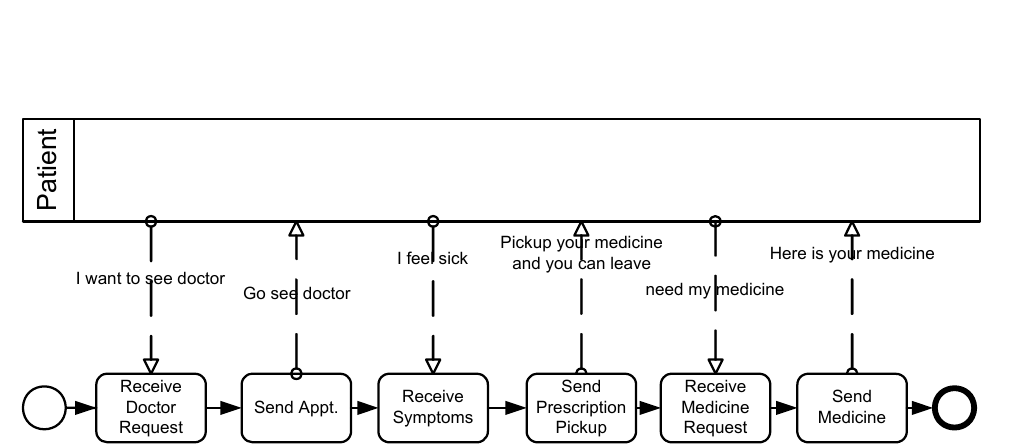
*Figure 7.2 – Example of a public Process* (p. 22)
#### Collaborations
A **Collaboration** depicts the interactions between two or more business entities. A **Collaboration** usually contains two or more **Pools**, representing the *Participants* in the **Collaboration**. The **Message** exchange between the *Participants* is shown by a **Message Flow** that connects two **Pools** (or the objects within the **Pools**). The **Messages** associated with the **Message Flows** can also be shown. The **Collaboration** can be shown as two or more *public* **Processes** communicating with each other (see Figure 7.3). With a *public* **Process**, the **Activities** for the **Collaboration** participants can be considered the “touch-points” between the participants. The corresponding internal (executable) **Processes** are likely to have much more **Activity** and detail than what is shown in the *public* **Processes**. Or a **Pool** MAY be empty, a “black box.” **Choreographies** MAY be shown “in between” the **Pools** as they bisect the **Message Flows** between the **Pools**. All combinations of **Pools**, **Processes**, and a **Choreography** are allowed in a **Collaboration**.
ceptionist/ Doctor Request Pickup Request
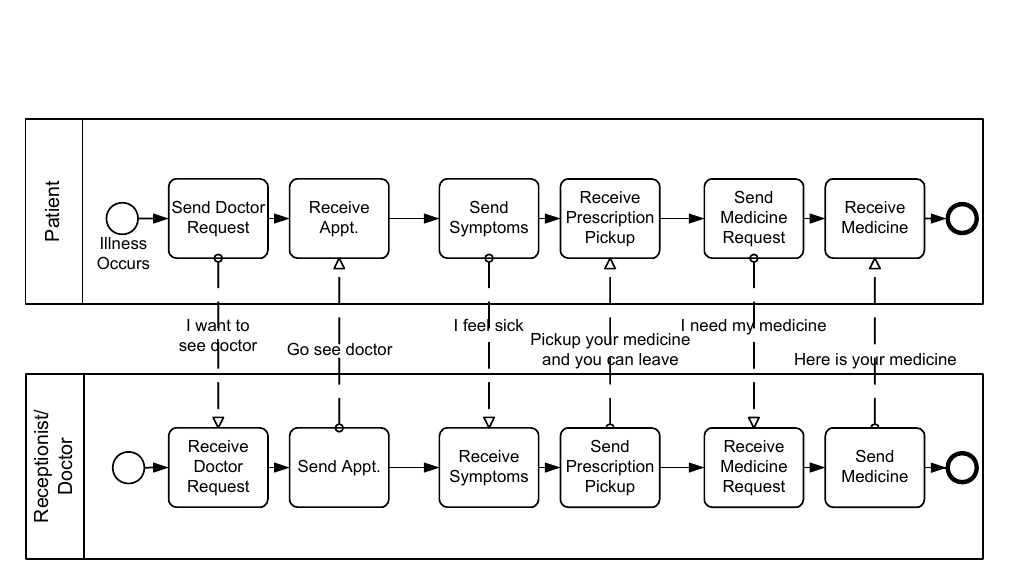
*Figure 7.3 – An example of a Collaborative Process* (p. 23)
#### Choreographies
A self-contained **Choreography** (no **Pools** or *Orchestration*) is a definition of the expected behavior, basically a procedural contract, between interacting *Participants*. While a normal **Process** exists within a **Pool**, a **Choreography** exists between **Pools** (or *Participants*). The **Choreography** looks similar to a *private* **Business Process** since it consists of a network of **Activities**, **Events**, and **Gateways** (see Figure 7.4). However, a **Choreography** is different in that the **Activities** are interactions that represent a set (1 or more) of **Message** exchanges, which involves two or more *Participants*. In addition, unlike a normal **Process**, there is no central controller, responsible entity, or observer of the **Process**.
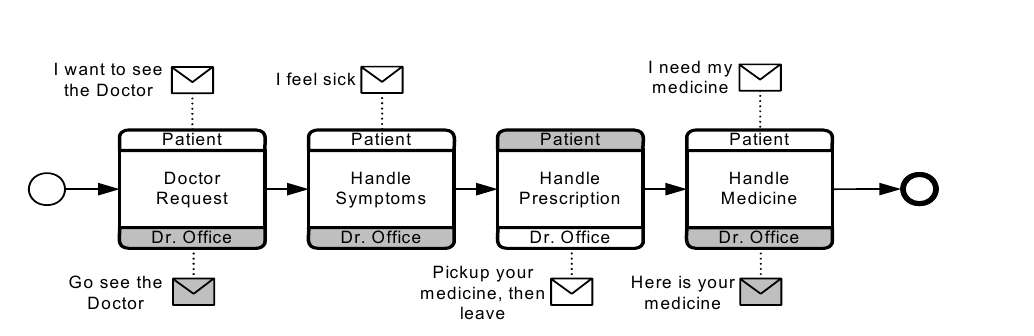
*Figure 7.4 – An example of a Choreography* (p. 23)
#### Conversations
The **Conversation** diagram is a particular usage of and an informal description of a **Collaboration** diagram. However, the **Pools** of a **Conversation** usually do not contain a **Process** and a **Choreography** is usually not placed in between the **Pools** of a **Conversation** diagram. A **Conversation** is the logical relation of **Message** exchanges. The logical relation, in practice, often concerns a business object(s) of interest, e.g., “Order,” “Shipment and Delivery,” or “Invoice.” **Message** exchanges are related to each other and reflect distinct business scenarios. For example, in logistics, stock replenishments involve the following type scenarios: creation of sales orders; assignment of carriers for shipments combining different sales orders; crossing customs/quarantine; processing payment, and investigating exceptions. Thus, a **Conversation** diagram, as shown in Figure 7.5, shows **Conversations** (as hexagons) between *Participants* (**Pools**). This provides a “bird’s eye” perspective of the different **Conversations** that relate to the domain.
Customs/ Notification Notification Insurance
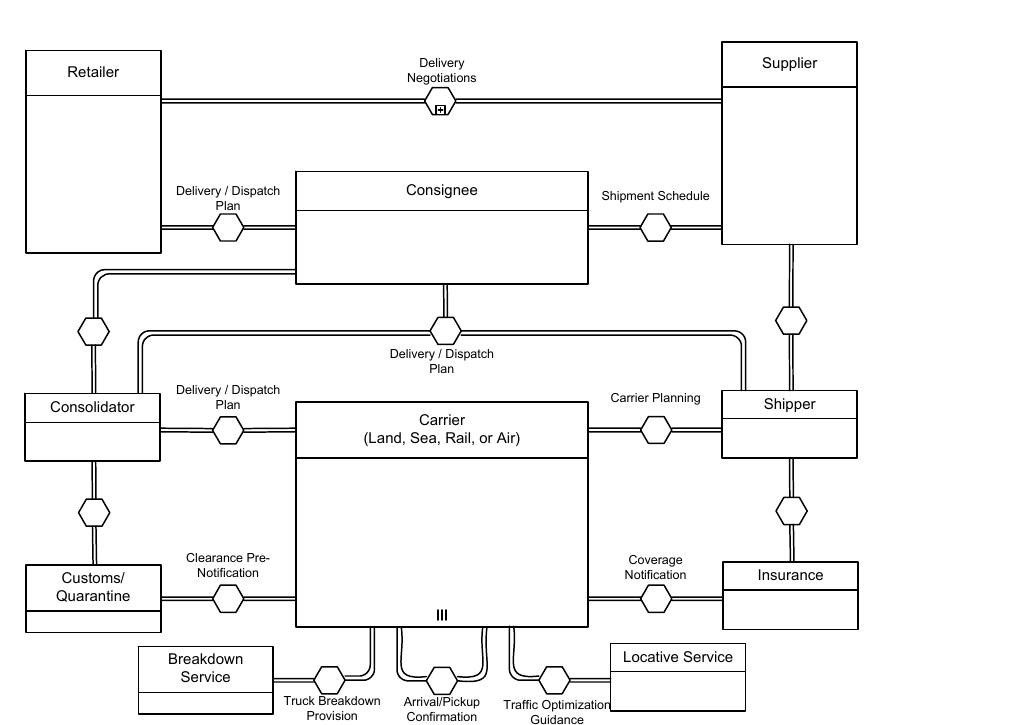
*Figure 7.5 – An example of a Conversation diagram* (p. 24)
#### Diagram Point of View
Since a **BPMN** Diagram MAY depict the **Processes** of different Participants, each Participant could view the Diagram differently. That is, the Participants have different points of view regarding how the **Processes** will apply to them. Some of the **Activities** will be internal to the Participant (meaning performed by or under control of the Participant) and other **Activities** will be external to the Participant. Each Participant will have a different perspective as to which are internal and external. At runtime, the difference between internal and external **Activities** is important in how a Participant can view the status of the **Activities** or troubleshoot any problems. However, the Diagram itself remains the same. Figure 7.3 displays a **Business Process** that has two points of view. One point of view is of a Patient, the other is of the Doctor’s office. The Diagram shows the **Activities** of both participants in the **Process**, but when the **Process** is actually being performed, each Participant will only have control over their own **Activities**. Although the Diagram point of view is important for a viewer of the Diagram to understand how the behavior of the **Process** will relate to that viewer, **BPMN** will not currently specify any graphical mechanisms to highlight the point of view. It is open to the modeler or modeling tool vendor to provide any visual cues to emphasize this characteristic of a Diagram.
#### Understanding the Behavior of Diagrams
Throughout this International Standard, we discuss how **Sequence Flows** are used within a **Process**. To facilitate this discussion, we employ the concept of a *token* that will traverse the **Sequence Flows** and pass through the elements in the **Process**. A *token* is a theoretical concept that is used as an aid to define the behavior of a **Process** that is being performed. The behavior of **Process** elements can be defined by describing how they interact with a *token* as it “traverses” the structure of the **Process**. However, modeling and execution tools that implement **BPMN** are NOT REQUIRED to implement any form of *token*. A **Start Event** generates a *token* that MUST eventually be consumed at an **End Event** (which MAY be implicit if not graphically displayed). The path of *tokens* should be traceable through the network of **Sequence Flows**, **Gateways**, and **Activities** within a **Process**. **NOTE:** A *token* does not traverse a **Message Flow** since it is a **Message** that is passed down a **Message Flow** (as the name implies).
## 7.3 BPMN Elements
It should be emphasized that one of the drivers for the development of **BPMN** is to create a simple and understandable mechanism for creating **Business Process** models, while at the same time being able to handle the complexity inherent to **Business Processes**. The approach taken to handle these two conflicting requirements was to organize the graphical aspects of the notation into specific categories. This provides a small set of notation categories so that the reader of a **BPMN** diagram can easily recognize the basic types of elements and understand the diagram. Within the basic categories of elements, additional variation and information can be added to support the requirements for complexity without dramatically changing the basic look and feel of the diagram. The five basic categories of elements are:
1. Flow Objects
2. Data
3. Connecting Objects
4. Swimlanes
5. Artifacts
*Flow Objects* are the main graphical elements to define the behavior of a **Business Process**. There are three *Flow Objects*:
1. Events
2. Activities
3. Gateways
*Data* is represented with the four elements:
1. Data Objects
2. Data Inputs
3. Data Outputs
4. Data Stores
There are four ways of connecting the Flow Objects to each other or other information. There are four Connecting Objects:
1. Sequence Flows
2. Message Flows
3. Associations
4. Data Associations
There are two ways of grouping the primary modeling elements through “Swimlanes:”
1. Pools
2. Lanes
Artifacts are used to provide additional information about the **Process**. There are two standardized Artifacts, but modelers or modeling tools are free to add as many Artifacts as necessary. There could be additional **BPMN** efforts to standardize a larger set of Artifacts for general use or for vertical markets. The current set of Artifacts includes:
- Group
- Text Annotation
### 7.3.1 Basic BPMN Modeling Elements
Table 7.1 displays a list of the basic modeling elements that are depicted by the notation.
**Table 7.1 – Basic Modeling Elements**
| Element | Description | Notation |
| --- | --- | --- |
| Event | An Event is something that “happens” during the course of a Process (see page 235) or a Choreography (see page 339). These Events affect the flow of the model and usually have a cause (*trigger*) or an impact (*result*). Events are circles with open centers to allow internal markers to differentiate different *triggers* or *results*. There are three types of Events, based on when they affect the flow: Start, Intermediate, and End. | |
| Activity | An Activity is a generic term for work that company performs (see page 149) in a Process. An Activity can be atomic or non-atomic (compound). The types of Activities that are a part of a Process Model are: Sub-Process and Task, which are rounded rectangles. Activities are used in both standard Processes and in Choreographies. | |
| Gateway | A Gateway is used to control the divergence and convergence of Sequence Flows in a Process (see page 147) and in a Choreography (see page 335). Thus, it will determine branching, forking, merging, and joining of paths. Internal markers will indicate the type of behavior control. | |
| Sequence Flow | A Sequence Flow is used to show the order that Activities will be performed in a Process (see page 95) and in a Choreography (see page 320). | |
| Message Flow | A Message Flow is used to show the flow of Messages between two *Participants* that are prepared to send and receive them (see page 113). In BPMN, two separate Pools in a Collaboration Diagram will represent the two *Participants* (e.g., PartnerEntities and/or PartnerRoles). | |
| Association | An Association is used to link information and Artifacts with BPMN graphical elements (see page 65). Text Annotations (see page 69) and other Artifacts (see page 64) can be Associated with the graphical elements. An arrowhead on the Association indicates a direction of flow (e.g., data), when appropriate. | |
| Pool | A Pool is the graphical representation of a *Participant* in a Collaboration (see page 113). It also acts as a “swimlane” and a graphical container for partitioning a set of Activities from other Pools, usually in the context of B2B situations. A Pool MAY have internal details, in the form of the Process that will be executed. Or a Pool MAY have no internal details, i.e., it can be a “black box.” | Name |
| Lane | A Lane is a sub-partition within a Process, sometimes within a Pool, and will extend the entire length of the Process, either vertically or horizontally (see on page 304). Lanes are used to organize and categorize Activities. | Name Name me Na |
| Data Object | Data Objects provide information about what Activities require to be performed and/or what they produce (see page 204), Data Objects can represent a singular object or a collection of objects. Data Input and Data Output provide the same information for Processes. | |
| Message | A Message is used to depict the contents of a communication between two *Participants* (as defined by a business PartnerRole or a business PartnerEntity—see on page 91). | |
| Group (a box around a group of objects within the same category) | A Group is a grouping of graphical elements that are within the same Category (see page 68). This type of grouping does not affect the Sequence Flows within the Group. The Category name appears on the diagram as the group label. Categories can be used for documentation or analysis purposes. Groups are one way in which Categories of objects can be visually displayed on the diagram. | |
| Text Annotation (attached with an Association) | Text Annotations are a mechanism for a modeler to provide additional text information for the reader of a BPMN Diagram (see page 69). | Descriptive Text Here |
### 7.3.2 Extended BPMN Modeling Elements
Table 7.2 displays a more extensive list of the **Business Process** concepts that could be depicted through a business process modeling notation.
**Table 7.2 – BPMN Extended Modeling Elements**
| Element | Description | Notation |
| --- | --- | --- |
| Event | An Event is something that “happens” during the course of a Process (see page 237) or a Choreography (see page 335). These Events affect the flow of the model and usually have a cause (*Trigger*) or an impact (*Result*). Events are circles with open centers to allow internal markers to differentiate different *Triggers* or *Results*. There are three types of Events, based on when they affect the flow: Start, Intermediate, and End. | |
| **Flow Dimension (e.g., Start, Intermediate, End)** Start | As the name implies, the Start Event indicates where a particular Process (see page 235) or Choreography (see page 339) will start. | Start |
| Intermediate | Intermediate Events occur between a Start Event and an End Event. They will affect the flow of the Process (see page 237) or Choreography (see page 340), but will not start or (directly) terminate the Process. | Intermediate |
| End | As the name implies, the End Event indicates where a Process (see page 245) or Choreography (see page 343) will end. | End |
| Type Dimension (e.g., None, Message, Timer, | The Start and some Intermediate Events have “triggers” that define the cause for the Event | **“Catching”** **“Throwing”** **Non-Interrupting** |
| Error, Cancel, | (See “Start Event” on page 237. and | **Message** |
| Compensation, | “Intermediate Event” on page 248). There are | **Timer** |
| Conditional, Link, Signal, | multiple ways that these events can be | |
| Multiple, Terminate.) | triggered. End Events MAY define a “result” that is a consequence of a Sequence Flow path ending. Start Events can only react to (“catch”) a *trigger.* End Events can only create (“throw”) a *result*. Intermediate Events can catch or throw *triggers*. For the Events, *triggers* that catch, the markers are unfilled, and for *triggers* and *results* that throw, the markers are filled. Additionally, some Events, which were used to interrupt Activities in BPMN 1.1, can now be used in a mode that does not interrupt. The boundary of these Events is dashed (see figure to the right). | **Error Escalation Cancel Compensation Conditional Link Signal Terminate Multiple Parallel Multiple** |
| Activity | An Activity is a generic term for work that company performs (see page 149) in a Process. An Activity can be atomic or nonatomic (compound). The types of Activities that are a part of a Process Model are: Sub- Process and Task, which are rounded rectangles. Activities are used in both standard Processes and in Choreographies. | |
| Task (Atomic) | A Task is an atomic Activity that is included within a Process (see page 154). A Task is used when the work in the Process is not broken down to a finer level of Process detail. | Task Name |
| Choreography Task | A Choreography Task is an atomic Activity in a Choreography (see page 323). It represents a set of one (1) or more Message exchanges. Each Choreography Task involves two (2) *Participants*. The name of the Choreography Task and each of the *Participants* are all displayed in the different bands that make up the shape’s graphical notation. There are two (2) or more *Participant* Bands and one Task Name Band. | Participant A Choreography Task Name Participant B |
| Process/Sub-Process (non-atomic) | A Sub-Process is a compound Activity that is included within a Process (see page 171) or Choreography (see page 335). It is compound in that it can be broken down into a finer level of detail (a Process or Choreography) through a set of sub-Activities. | See Next Four Figures |
| Collapsed Sub-Process | The details of the Sub-Process are not visible in the Diagram (see page 171). A “plus” sign in the lower-center of the shape indicates that the Activity is a Sub-Process and has a lower-level of detail. | Sub-Process Name |
| Expanded Sub-Process | The boundary of the Sub-Process is expanded and the details (a Process) are visible within its boundary (see page 171). Note that Sequence Flows cannot cross the boundary of a Sub-Process. | |
| Collapsed Sub- | The details of the Sub-Choreography are not | |
| Choreography | visible in the Diagram (see page 328). A “plus” sign in the lower-center of the Task Name Band of the shape indicates that the Activity is a Sub-Process and has a lower-level of detail. | Participant A Sub- Choreography Name Participant B |
| Expanded Sub- | The boundary of the Sub-Choreography is | |
| Choreography | expanded and the details (a Choreography) are visible within its boundary (see page 328). Note that Sequence Flows cannot cross the boundary of a Sub-Choreography. | Participant AParticipant C Sub-Choreography Name Participant C Participant A Choreography Choreography Task Name Task Name Participant B Participant C Participant B |
| Gateway | A Gateway is used to control the divergence and convergence of Sequence Flows in a Process (see page 286) and in a Choreography (see page 344). Thus, it will determine branching, forking, merging, and joining of paths. Internal markers will indicate the type of behavior control (see below). | |
| Gateway Control Types | Icons within the diamond shape of the Gateway will indicate the type of flow control behavior. The types of control include: • Exclusive decision and merging. Both Exclusive (see page 286) and Event-Based (see page 296) perform exclusive decisions and merging Exclusive can be shown with or without the “X” marker. • Event-Based and Parallel Event-based gateways can start a new instance of the Process. • Inclusive Gateway decision and merging (see page 291). • Complex Gateway -- complex conditions and situations (e.g., 3 out of 5; page 294). • Parallel Gateway forking and joining (see page 292). Each type of control affects both the incoming and outgoing flow. | **X****Exclusive or Event-Based Parallel Event-Based Inclusive Complex Parallel** |
| Sequence Flow | A Sequence Flow is used to show the order that Activities will be performed in a Process (see page 95) and in a Choreography (see page 323). | See next seven figures |
| Normal Flow | *Normal flow* refers to paths of Sequence Flow that do not start from an Intermediate Event attached to the boundary of an Activity. | |
| Uncontrolled flow | *Uncontrolled flow* refers to flow that is not affected by any conditions or does not pass through a Gateway. The simplest example of this is a single Sequence Flow connecting two Activities. This can also apply to multiple Sequence Flows that converge to or diverge from an Activity. For each uncontrolled Sequence Flows a *token* will flow from the source object through the Sequence Flows to the target object. | |
| Conditional flow | A Sequence Flow can have a condition Expression that are evaluated at runtime to determine whether or not the Sequence Flow will be used (i.e., will a *token* travel down the Sequence Flow – see page 95). If the *conditional flow* is outgoing from an Activity, then the Sequence Flow will have a mini-diamond at the beginning of the connector (see figure to the right). If the *conditional flow* is outgoing from a Gateway, then the line will not have a mini-diamond (see figure in the row above). | |
| Default flow | For Data-Based Exclusive Gateways or Inclusive Gateways, one type of flow is the Default *condition flow* (see page 95). This flow will be used only if all the other outgoing *conditional flow* is not *true* at runtime. These Sequence Flows will have a diagonal slash will be added to the beginning of the connector (see the figure to the right). | |
| Exception Flow | *Exception flow* occurs outside the *normal flow* of the Process and is based upon an Intermediate Event attached to the boundary of an Activity that occurs during the performance of the Process (see page 286). | Exception Flow |
| Message Flow | A Message Flow is used to show the flow of Messages between two *Participants* that are prepared to send and receive them (see page 122). In BPMN, two separate Pools in a Collaboration Diagram will represent the two *Participants* (e.g., PartnerEntities and/or PartnerRoles). | |
| Compensation | *Compensation* Association occurs outside the | |
| Association | *normal flow* of the Process and is based upon a Compensation Intermediate Event that is triggered through the failure of a *transaction* or a *throw* Compensation Event (see page 302). The target of the Association MUST be marked as a Compensation Activity. | Compensation Association |
| Data Object | Data Objects provide information about what Activities require to be performed and/or what they produce (see page 204), Data Objects can represent a singular object or a collection of objects. Data Input and Data Output provide the same information for Processes. | **Data Object Data Object (Collection)** Data Input Data Output |
| Message | A Message is used to depict the contents of a communication between two *Participants* (as defined by a business PartnerRole or a business PartnerEntity—see on page 91). | |
| Fork | BPMN uses the term “fork” to refer to the dividing of a path into two or more parallel paths (also known as an AND-Split). It is a place in the Process where activities can be performed concurrently, rather than sequentially. There are two options: • Multiple Outgoing Sequence Flows can be used (see figure top-right). This represents “uncontrolled” flow is the preferred method for most situations. • A Parallel Gateway can be used (see figure bottom-right). This will be used rarely, usually in combination with other Gateways. | |
| Join | BPMN uses the term “join” to refer to the combining of two or more parallel paths into one path (also known as an AND-Join or synchronization). A Parallel Gateway is used to show the joining of multiple Sequence Flows. | |
| Decision, Branching | Decisions are Gateways within a Process | |
| Point | (see page 286) or a Choreography (see page 344) where the flow of control can take one or more alternative paths. | See next five rows. |
| Exclusive | This Decision represents a branching point where Alternatives are based on conditional Expressions contained within the *outgoing* Sequence Flows (see page 288 or page 344). Only one of the Alternatives will be chosen. | Condition 1 Default |
| Event-Based | This Decision represents a branching point where Alternatives are based on an Event that occurs at that point in the Process (see page 296) or Choreography (see page 349). The specific Event, usually the receipt of a Message, determines which of the paths will be taken. Other types of Events can be used, such as Timer. Only one of the Alternatives will be chosen. There are two options for receiving Messages: • Tasks of Type Receive can be used (see figure top-right). • Intermediate Events of Type Message can be used (see figure bottom-right). | |
| Inclusive | This Decision represents a branching point where Alternatives are based on conditional Expressions contained within the outgoing Sequence Flows (see page 291). In some sense it is a grouping of related independent Binary (Yes/No) Decisions. Since each path is independent, all combinations of the paths MAY be taken, from zero to all. However, it should be designed so that at least one path is taken. A Default Condition could be used to ensure that at least one path is taken. There are two versions of this type of Decision: • The first uses a collection of conditional Sequence Flows, marked with mini-diamonds (see top-right figure). • The second uses an Inclusive Gateway (see bottom-right picture). | Condition 1 Condition 2 Condition 1 Condition 2 |
| Merging | BPMN uses the term “merge” to refer to the exclusive combining of two or more paths into one path (also known as an OR-Join). A Merging Exclusive Gateway is used to show the merging of multiple Sequence Flows (see upper figure to the right). If all the incoming flow is alternative, then a Gateway is not needed. That is, uncontrolled flow provides the same behavior (see lower figure to the right). | |
| Looping | BPMN provides two mechanisms for looping within a Process. | See Next Two Figures |
| Activity Looping | The attributes of Tasks and Sub-Processes will determine if they are repeated or performed once (see page 188). There are two types of loops: Standard and Multi- Instance. A small looping indicator will be displayed at the bottom-center of the activity. | |
| Sequence Flow Looping | Loops can be created by connecting a Sequence Flow to an “upstream” object. An object is considered to be upstream if that object has an outgoing Sequence Flow that leads to a series of other Sequence Flows, the last of which is an incoming Sequence Flow for the original object. | |
| Multiple Instances | The attributes of Tasks and Sub-Processes will determine if they are repeated or performed once (see page 190). A set of three horizontal lines will be displayed at the bottom-center of the activity for sequential Multi-Instances (see upper figure to the right). A set of three vertical lines will be displayed at the bottom-center of the activity for sequential Multi-Instances (see lower figure to the right). | **Sequential Parallel** |
| Process Break (something out of the control of the process makes the process pause) | A Process Break is a location in the Process that shows where an expected delay will occur within a Process. An Intermediate Event is used to show the actual behavior (see top-right figure). In addition, a Process Break Artifact, as designed by a modeler or modeling tool, can be associated with the Event to highlight the location of the delay within the flow. | Announce Increment Issues for Vote Tally Voting Response |
| Transaction | A transaction is a Sub-Process that is supported by a special protocol that insures that all parties involved have complete agreement that the activity should be completed or canceled (see page 176). The attributes of the activity will determine if the activity is a transaction. A double-lined boundary indicates that the Sub-Process is a Transaction. | |
| Nested/Embedded Sub- | A nested (or embedded) Sub-Process is an | |
| Process (Inline Block) | activity that shares the same set of data as its parent process (see page 171). This is opposed to a Sub-Process that is independent, re-usable, and referenced from the parent process. Data needs to be passed to the referenced Sub-Process, but not to the nested Sub-Process. | There is no special indicator for nested Sub- Processes |
| Group (a box around a group of objects within the same category) | A Group is a grouping of graphical elements that are within the same *Category* (see page 66). This type of grouping does not affect the Sequence Flows within the Group. The *Category* name appears on the diagram as the group label. *Categories* can be used for documentation or analysis purposes. Groups are one way in which *Categories* of objects can be visually displayed on the diagram. | |
| Off-Page Connector | Generally used for printing, this object will show where a Sequence Flow leaves one page and then restarts on the next page. A Link Intermediate Event can be used as an Off-Page Connector. | |
| Association | An Association is used to link information and Artifacts with BPMN graphical elements (see page 65). Text Annotations (see page 69) and other Artifacts (see page 64) can be Associated with the graphical elements. An arrowhead on the Association indicates a direction of flow (e.g., data), when appropriate. | |
| Text Annotation (attached with an Association) | Text Annotations are a mechanism for a modeler to provide additional text information for the reader of a BPMN Diagram (see page 69). | Descriptive Text Here |
| Pool | A Pool is the graphical representation of a *Participant* in a Collaboration (see page 110). It also acts as a “swimlane” and a graphical container for partitioning a set of Activities from other Pools, usually in the context of B2B situations. A Pool MAY have internal details, in the form of the Process that will be executed. Or a Pool MAY have no internal details, i.e., it can be a “black box.” | Name |
| Lanes | A Lane is a sub-partition within a Pool and will extend the entire length of the Pool, either vertically or horizontally (see on page 304). Lanes are used to organize and categorize Activities. | Name Name me Na |
## 7.4 BPMN Diagram Types
The **BPMN 2.0.2** aims to cover three basic models of **Processes**: *private* **Processes** (both *executable* and *non- executable*), *public* **Processes**, and **Choreographies**. Within and between these three **BPMN** sub-models, many types of Diagrams can be created. The following are examples of **Business Processes** that can be modeled using **BPMN 2.0.2**:
- High-level non-executable Process Activities (not functional breakdown).
- Detailed executable Business Process.
- As-is or old Business Process.
- To-be or new Business Process.
- A description of expected behavior between two (2) or more business Participants—a Choreography.
- Detailed private Business Process (either executable or non-executable) with interactions to one or more external *Entities* (or “Black Box” **Processes**).
- Two or more detailed executable Processes interacting.
- Detailed executable Business Process relationship to a Choreography.
- Two or more public Processes.
- Public Process relationship to Choreography.
- Two or more detailed executable Business Processes interacting through a Choreography.
**BPMN** is designed to allow describing all above examples of **Business Processes**. However, the ways that different sub-models are combined is left to tool vendors. A **BPMN 2.0.2** compliant implementation could RECOMMEND that modelers pick a focused purpose, such as a *private* **Process**, or **Choreographies**. However, the **BPMN 2.0.2** International Standard makes no assumptions.
## 7.5 Use of Text, Color, Size, and Lines in a Diagram
**Text Annotation** objects can be used by the modeler to display additional information about a **Process** or attributes of the objects within a **BPMN** Diagram. BPMN elements (e.g., Flow objects) MAY have labels (e.g., its name and/or other attributes) placed inside the shape, or above or below the shape, in any direction or location, depending on the preference of the modeler or modeling tool vendor. The fills that are used for the graphical elements MAY be white or clear.
Flow objects and markers MAY be of any size that suits the purposes of the modeler or modeling tool. The lines that are used to draw the graphical elements MAY be black.
## 7.6 Flow Object Connection Rules
An *incoming* **Sequence Flow** can connect to any location on a Flow Object (left, right, top, or bottom). Likewise, an *outgoing* **Sequence Flow** can connect from any location on a Flow Object (left, right, top, or bottom). A **Message Flow** also has this capability. **NOTE: BPMN** allows this flexibility; however, we also RECOMMEND that modelers use judgment or best practices in how Flow Objects should be connected so that readers of the Diagrams will find the behavior clear and easy to follow. This is even more important when a Diagram contains **Sequence Flows** and **Message Flows**. In these situations it is best to pick a direction of **Sequence Flows**, either left to right or top to bottom, and then direct the **Message Flows** at a 90o angle to the **Sequence Flows**. The resulting Diagrams will be much easier to understand.
### 7.6.1 Sequence Flow Connections Rules
Table 7.3 displays the **BPMN** Flow Objects and shows how these objects can connect to one another through **Sequence Flows**. These rules apply to the connections within a **Process** Diagram and within a **Choreography** Diagram. The symbol indicates that the object listed in the row can connect to the object listed in the column. The quantity of connections into and out of an object is subject to various configuration dependencies are not specified here. Refer to the sub clauses in the next clause for each individual object for more detailed information on the appropriate connection rules. *Note that if a Sub-Process has been expanded within a Diagram, the objects within the Sub-Process cannot be connected to objects outside of the Sub-Process*, *nor can Sequence Flows cross a Pool boundary*.
**Table 7.3 – Sequence Flow Connection Rules**
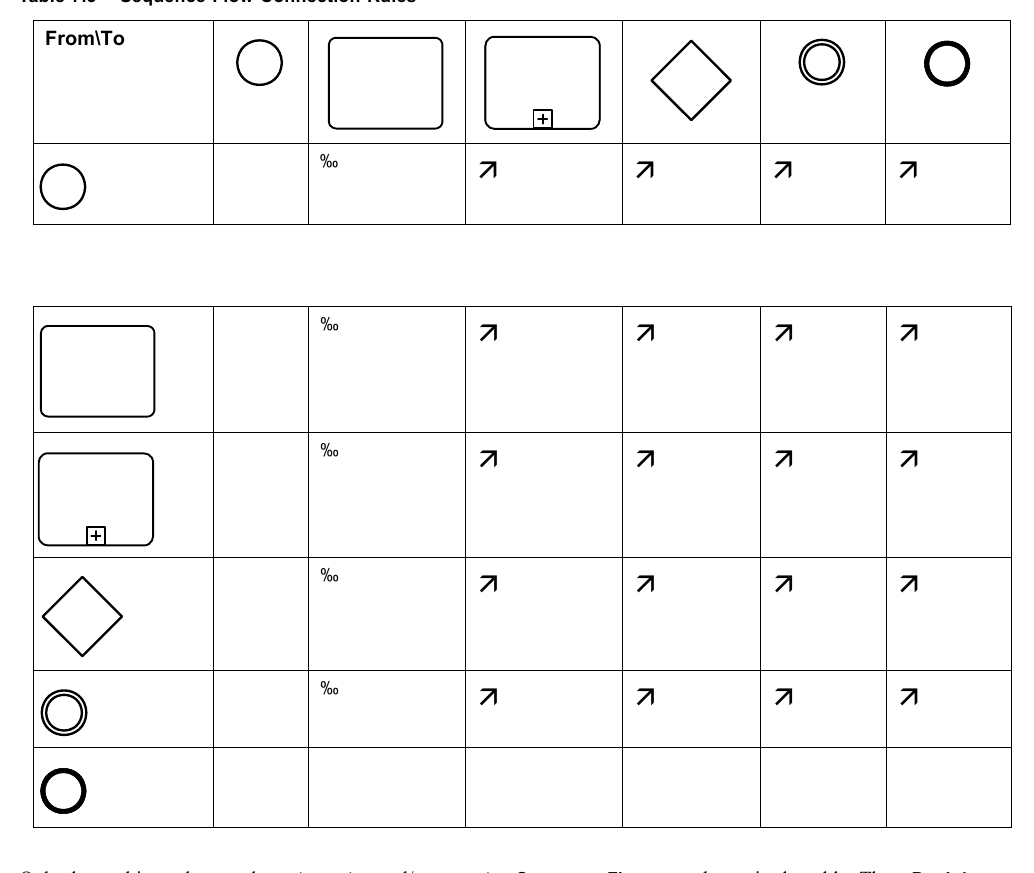
Only those objects that can have *incoming* and/or *outgoing* **Sequence Flows** are shown in the table. Thus, **Pool**, **Lane**, **Data Object**, **Group**, and **Text Annotation** are not listed in the table. Also, the **Activity** shapes in the table represent **Activities** and **Sub-Processes** for **Processes**, and **Choreography Activities** and **Sub-Choreographies** for
### 7.6.2 Message Flow Connection Rules
Table 7.4 displays the **BPMN** modeling objects and shows how these objects can connect to one another through **Message Flows**. These rules apply to the connections within a **Collaboration** Diagram. The symbol indicates that the object listed in the row can connect to the object listed in the column. The quantity of connections into and out of an object is subject to various configuration dependencies that are not specified here. Refer to the sub clauses in the next clause for each individual object for more detailed information on the appropriate connection rules. *Note that Message Flows cannot connect to objects that are within the same Pool*.
**Table 7.4 – Message Flow Connection Rules**
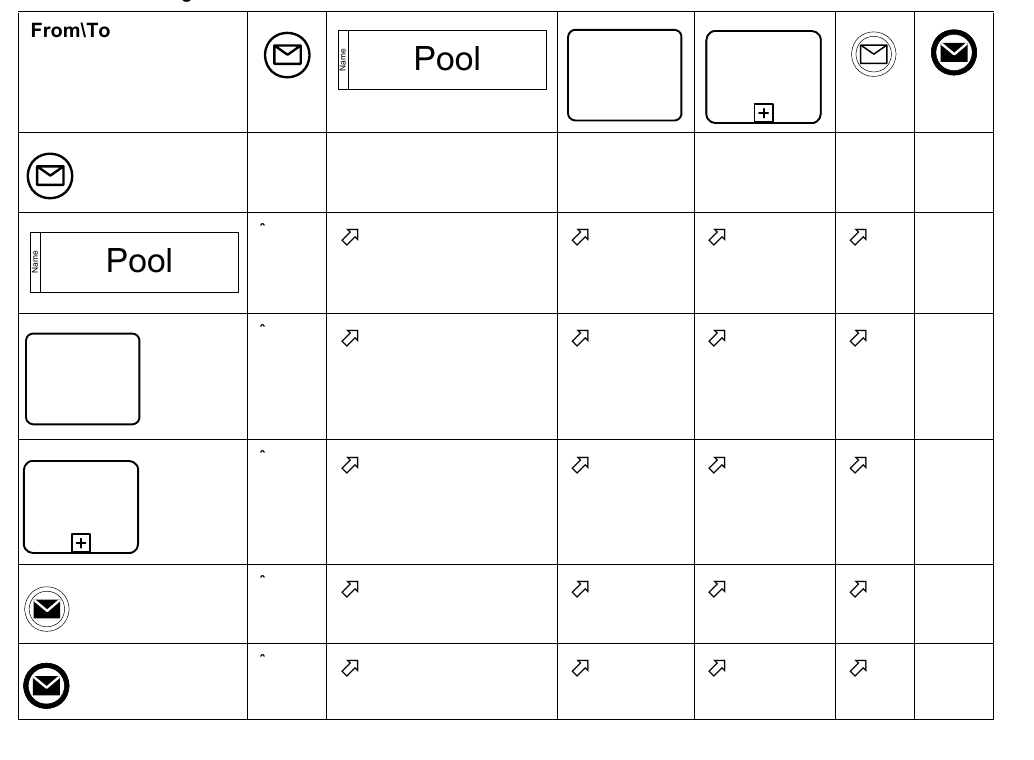
Only those objects that can have *incoming* and/or *outgoing* **Message Flows** are shown in the table. Thus, **Lane**, **Gateway**, **Data Object**, **Group**, and **Text Annotation** are not listed in the table.
## 7.7 BPMN Extensibility
**BPMN 2.0.2** introduces an extensibility mechanism that allows extending standard **BPMN** elements with additional attributes. It can be used by modelers and modeling tools to add non-standard elements or Artifacts to satisfy a specific need, such as the unique requirements of a vertical domain, and still have valid **BPMN** Core. Extension attributes MUST NOT contradict the semantics of any **BPMN** element. In addition, while extensible, **BPMN** Diagrams should still have the basic look-and-feel so that a Diagram by any modeler should be easily understood by any viewer of the Diagram. Thus the footprint of the basic flow elements (**Events**, **Activities**, and **Gateways**) MUST NOT be altered. The International Standard differentiates between mandatory and optional extensions (sub clause 8.3.3 explains the syntax used to declare extensions). If a mandatory extension is used, a compliant implementation MUST understand the extension. If an optional extension is used, a compliant implementation MAY ignore the extension.
## 7.8 BPMN Example
The following is an example of a manufacturing process from different perspectives.
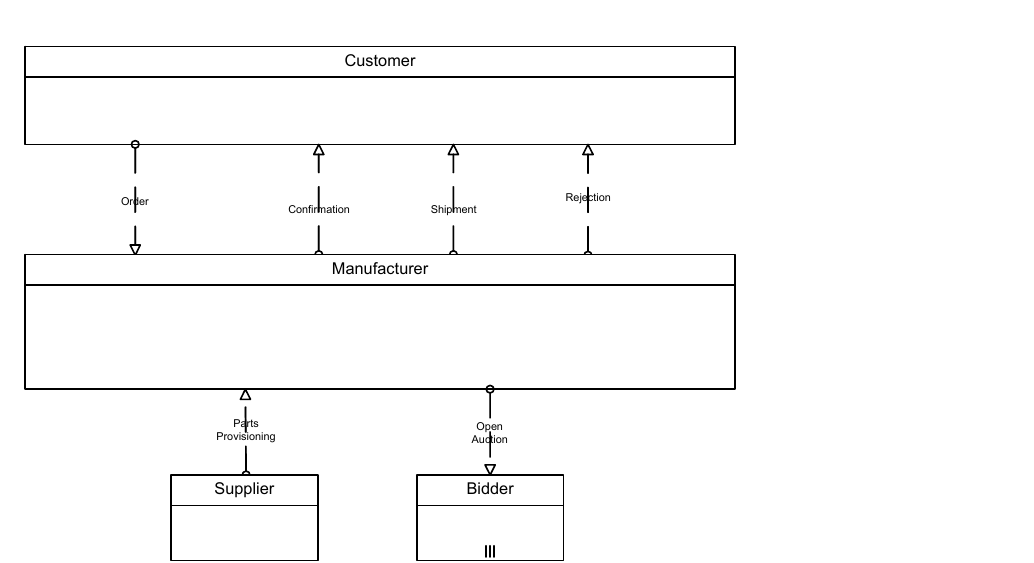
*Figure 7.6 – An example of a Collaboration diagram with black-box Pools* (p. 43)
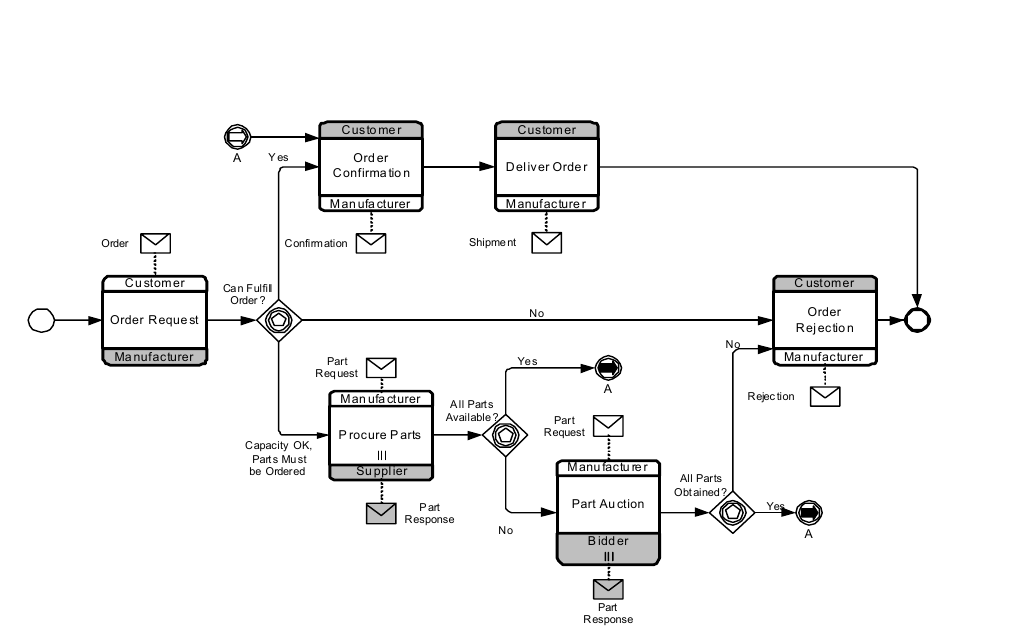
*Figure 7.7 – An example of a stand-alone Choreography diagram* (p. 44)
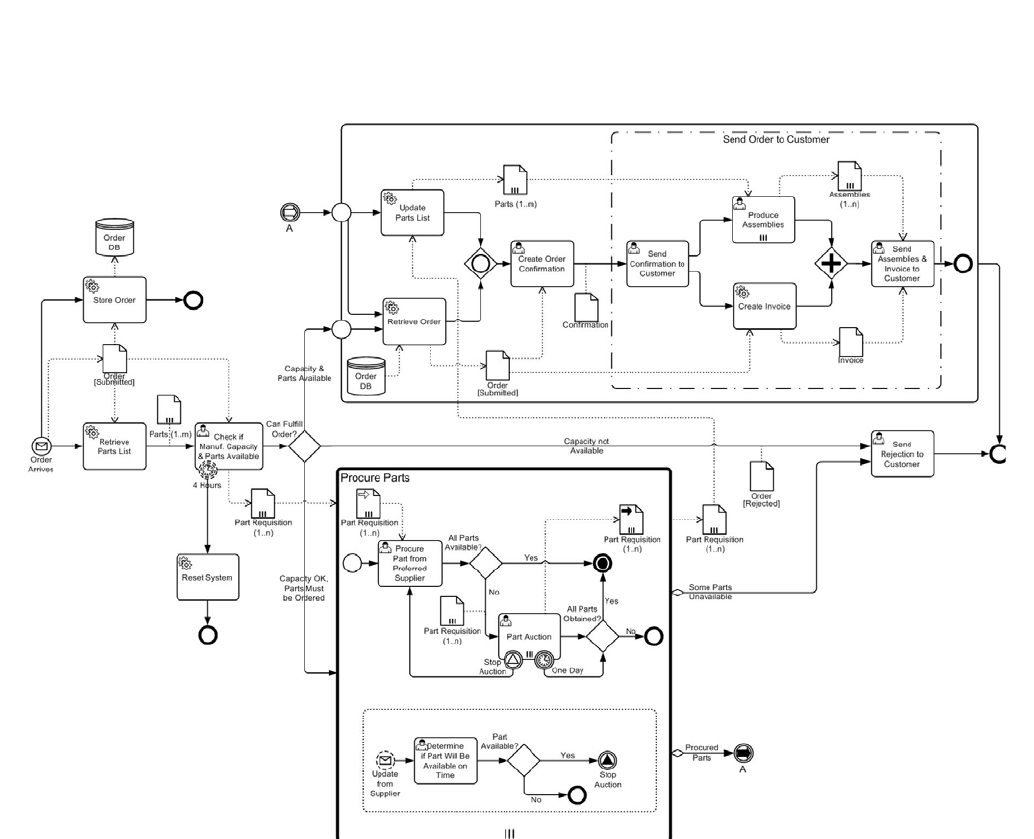
*Figure 7.8 – An example of a stand-alone Process (Orchestration) diagram* (p. 45)