---
title: "10.4 Items and Data"
chapter: "10 Process"
source: "OMG BPMN 2.0.2 — formal/2013-12-09"
pages: "202-232"
---
> 10 Process · páginas 202-232 · [índice](../README.md)
## 10.4 Items and Data
A traditional requirement of **Process** modeling is to be able to model the items (physical or information items) that are created, manipulated, and used during the execution of a **Process**. An important aspect of this is the ability to capture the structure of that data and to query or manipulate that structure. **BPMN** does not itself provide a built-in model for describing structure of data or an Expression language for querying that data. Instead it formalizes hooks that allow for externally defined data structures and Expression languages. In addition, **BPMN** allows for the co-existence of multiple data structure and Expression languages within the same model. The compatibility and verification of these languages is outside the scope of this International Standard and becomes the responsibility of the tool vendor. **BPMN** designates XML Schema and XPath as its default data structure and Expression languages respectively, but vendors are free to substitute their own languages.
### 10.4.1 Data Modeling
A traditional requirement of **Process** modeling is to be able to model the items (physical or information items) that are created, manipulated, and used during the execution of a **Process**. This requirement is realized in **BPMN** through various constructs: **Data Objects**, *ItemDefinition*, *Properties*, *Data Inputs*, *Data Outputs*, **Messages**, *Input Sets*, *Output Sets*, and **Data Associations**.
#### Item-Aware Elements
Several elements in **BPMN** are subject to store or convey items during process execution. These elements are referenced generally as “item-aware elements.” This is similar to the variable construct common to many languages. As with variables, these elements have an ItemDefinition.
The data structure these elements hold is specified using an associated ItemDefinition. An ItemAwareElement MAY be underspecified, meaning that the structure attribute of its ItemDefinition is optional if the modeler does not wish to define the structure of the associated data. The elements in the specification defined as item-aware elements are: **Data Objects**, **Data Object References**, **Data**
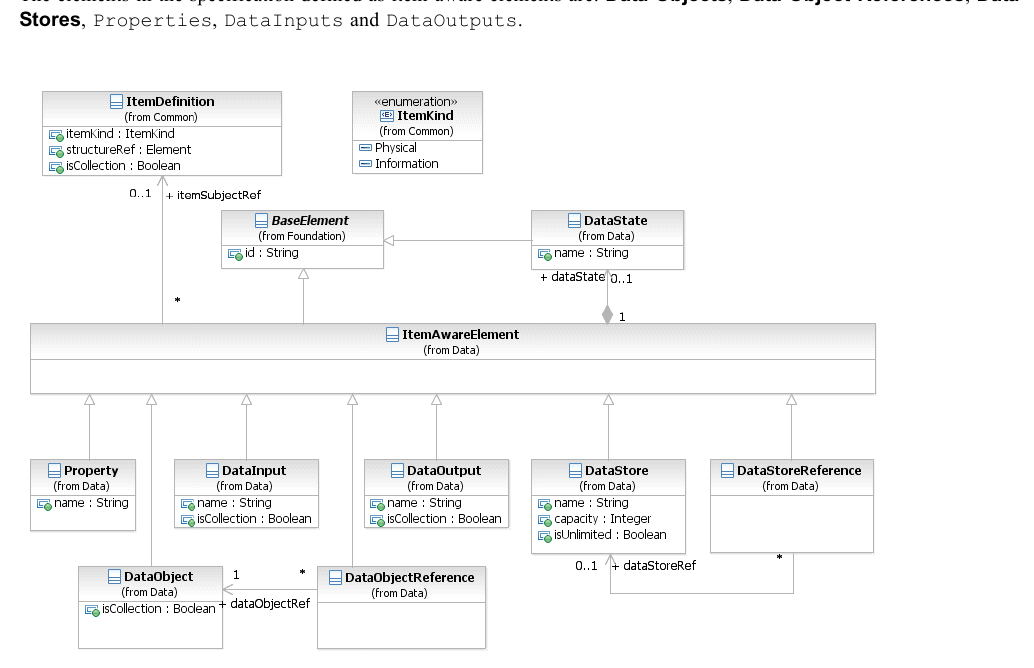
*Figure 10.50 – ItemAware class diagram* (p. 203)
The ItemAwareElement element inherits the attributes and model associations of BaseElement (see Table 8.5). Table 10.51 presents the additional model associations of the ItemAwareElement element.
**Table 10.51 – ItemAwareElement model associations**
| Attribute Name | Description/Usage |
| --- | --- |
| **itemSubjectRef**: ItemDefinition [0..1] | Specification of the items that are stored or conveyed by the ItemAwareElement. |
| **dataState**: DataState [0..1] | A reference to the DataState, which defines certain states for the data contained in the Item. |
#### Data Objects
The primary construct for modeling data within the **Process** flow is the DataObject element. A DataObject has a well-defined lifecycle, with resulting access constraints.
#### DataObject
The **Data Object** class is an item-aware element. **Data Object** elements MUST be contained within **Process** or **Sub- Process** elements. **Data Object** elements are visually displayed on a **Process** diagram. **Data Object References** are a way to reuse **Data Objects** in the same diagram. They can specify different states of the same **Data Object** at different points in a **Process**. **Data Object Reference** cannot specify item definitions, and **Data Objects** cannot specify states. The names of **Data Object References** are derived by concatenating the name of the referenced Data **Data Object** the state of the **Data Object Reference** in square brackets as follows: [ ].
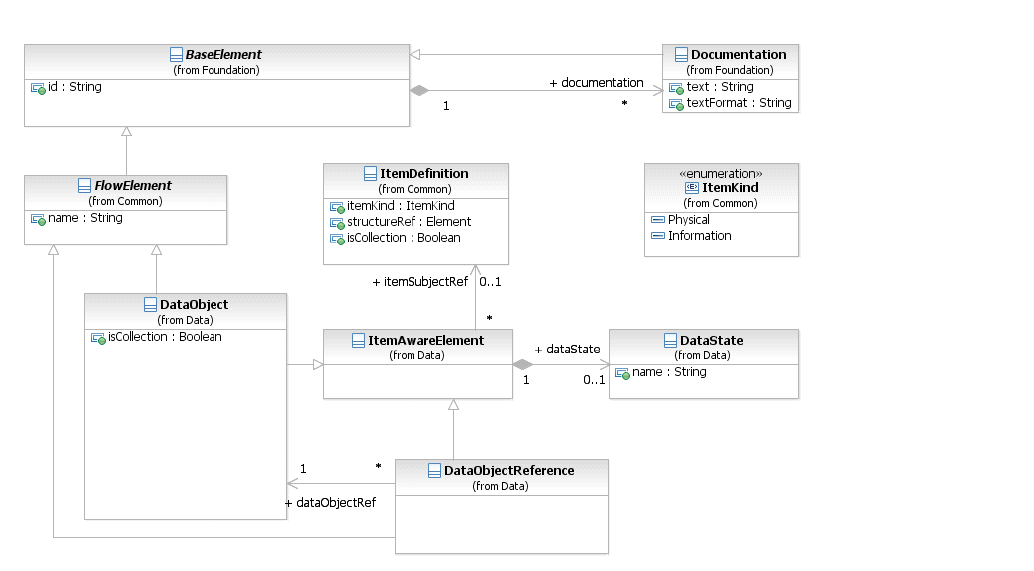
*Figure 10.51 – DataObject class diagram* (p. 204)
The **DataObject** element inherits the attributes and model associations of FlowElement (see Table 8.44) and ItemAwareElement (Table 10.52). Table 10.54 presents the additional attributes of the **DataObject** element.
**Table 10.52 – DataObject attributes**
| Attribute Name | Description/Usage |
| --- | --- |
| **isCollection**: boolean = false | Defines if the **Data Object** represents a collection of elements. It is needed when no itemDefinition is referenced. If an itemDefinition is referenced, then this attribute MUST have the same value as the isCollection attribute of the referenced itemDefinition. The default value for this attribute is *false*. |
The **Data Object Reference** element inherits the attributes and model associations of ItemAwareElement (Table 10.52) and FlowElement (see Table 8.44). Table 10.53 presents the additional attributes of the **Data Object**
**Table 10.53 – DataObjectReference attributes and model associations**
| Attribute Name | Description/Usage |
| --- | --- |
| **dataObjectRef**: DataObject | The **Data Object** referenced by the **Data Object Reference**. |
#### States
**Data Object** elements can optionally reference a DataState element, which is the state of the data contained in the **Data Object** (see an example of DataStates used for **Data Objects** in Figure 7.8). The definition of these states, e.g., possible values and any specific semantic are out of scope of this International Standard. Therefore, **BPMN** adopters can use the State element and the **BPMN** extensibility capabilities to define their states. The DataState element inherits the attributes and model associations of BaseElement (see Table 8.5). Table 10.54 presents the additional attributes and model associations of the **DataObject** element.
**Table 10.54 – DataState attributes and model associations**
| Attribute Name | Description/Usage |
| --- | --- |
| **name**: string | Defines the name of the DataState. |
#### Data Objects representing a Collection of Data
A **DataObject** element that references an ItemDefinition marked as *collection* has to be visualized differently, compared to single *instance* data structures. The notation looks as follows: Single *instance* (see Figure 10.52 )

*Figure 10.52 – A DataObject* (p. 206)
Collection (see Figure 10.53 )

*Figure 10.53 – A DataObject that is a collection* (p. 206)
#### Visual representations of Data Objects
**Data Object** can appear multiple times in a **Process** diagram. Each of these appearances references the same **Data Object** *instance*. Multiple occurrences of a **Data Object** in a diagram are allowed to simplify diagram connections.
#### Lifecycle and Accessibility
The lifecycle of a **Data Object** is tied to the lifecycle of its parent **Process** or **Sub-Process**. When a **Process** or **Sub-Process** is instantiated, all **Data Objects** contained within it are also instantiated. When a **Process** or **Sub- Process** *instance* is disposed, all **Data Object** *instances* contained within it are also disposed. At this point the data within these *instances* are no longer available. The accessibility of a **Data Object** is driven by its lifecycle. The data within a **Data Object** can only be accessed when there is guaranteed to be a live **Data Object** *instance* present. As a result, a **Data Object** can only be accessed by its immediate parent (**Process** or **Sub-Process**), or by its sibling Flow Elements and their children, including **Data Object References** referencing the **Data Object**. For example - Consider the follow structure:
3. Process A
“Data object 1” can be accessed by “Process A,” “Task A,” “Sub-Process A,” “Task B,” “Sub-Process B,” “Sub-Process C,” “Task C,” and “Task D.” “Data object 2” can be accessed by: “Sub-Process A” and “Task B.” “Data object 3” can be accessed by: “Sub-Process B,” “Sub-Process C,” “Task C,” and “Task D.” “Data object 4” can be accessed by: “Sub-Process C” and “Task C.”
#### Data Stores
A DataStore provides a mechanism for **Activities** to retrieve or update stored information that will persist beyond the scope of the **Process**. The same DataStore can be visualized, through a **Data Store Reference**, in one or more places in the **Process**. The **Data Store Reference** is an ItemAwareElement and can thus be used as the source or target for a **Data Association**. When data flows into or out of a **Data Store Reference**, it is effectively flowing into or out of the DataStore that is being referenced. The notation looks as follows (see Figure 10.54):

*Figure 10.54 – A Data Store* (p. 207)
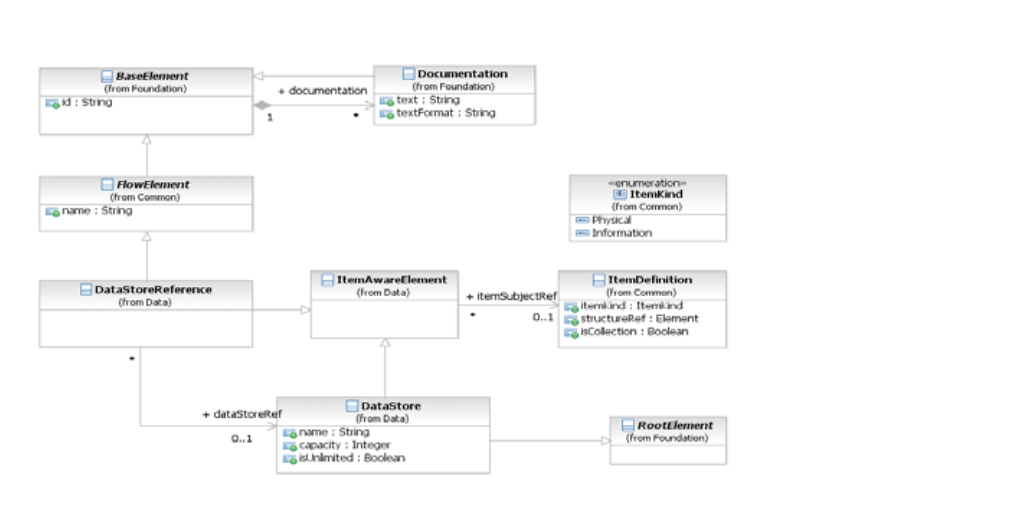
*Figure 10.55 – DataStore class diagram* (p. 207)
The DataStore element inherits the attributes and model associations of FlowElement (see Table 8.44) through its relationship to RootElement, and ItemAwareElement (see Table 10.51). Table 10.55 presents the additional attributes of the DataStore element.
**Table 10.55 – Data Store attributes**
| Attribute Name | Description/Usage |
| --- | --- |
| **name**: string | A descriptive name for the element. |
| **capacity**: integer [0..1] | Defines the capacity of the **Data Store**. This is not needed if the isUnlimited attribute is set to *true*. |
| **isUnlimited**: boolean = false | If isUnlimited is set to *true*, then the capacity of a **Data Store** is set as unlimited and will override any value of the capacity attribute. |
The **Data Store Reference** element inherits the attributes and model associations of FlowElement (see Table 8.44) and ItemAwareElement (see Table 10.51). Table 10.56 presents the additional model associations of the **Data Store**
**Table 10.56 – Data Store attributes**
| Attribute Name | Description/Usage |
| --- | --- |
| **dataStoreRef**: DataStore | Provides the reference to a global DataStore. |
#### Properties
Properties, like **Data Objects**, are item-aware elements. But, unlike **Data Objects**, they are not visually displayed on a **Process** diagram. Certain *flow elements* MAY contain properties, in particular only **Processes**, **Activities**, and **Events** MAY contain Properties. The Property class is a DataElement element that acts as a container for data associated with flow elements. Property elements MUST be contained within a FlowElement. Property elements are not visually displayed on a **Process** diagram.

*Figure 10.56 – Property class diagram* (p. 209)
The Property element inherits the attributes and model associations of ItemAwareElement (Table 10.51). Table 10.54 presents the additional attributes of the Property element.
**Table 10.57 – Property attributes**
| Attribute Name | Description/Usage |
| --- | --- |
| **name**: string | Defines the name of the Property. |
#### Lifecycle and Accessibility
The lifecycle of a Property is tied to the lifecycle of its parent Flow Element. When a Flow Element is instantiated, all Properties contained by it are also instantiated. When a Flow Element *instance* is disposed, all Property *instances* contained by it are also disposed. At this point the data within these *instances* are no longer available. The accessibility of a Property is driven by its lifecycle. The data within a Property can only be accessed when there is guaranteed to be a live Property *instance* present. As a result, a Property can only be accessed by its parent **Process**, **Sub-Process, or** *Flow Element*. In case the parent is a **Process** or **Sub-Process**, then a property can be accessed by the immediate children (including children elements) of that **Process** or **Sub-Process**. For example, consider the following structure:
3. Process A
The Properties of “Process A” are accessible by: “Process A,” “Task A,” “Sub-Process A,” “Task B,” “Sub-Process B,” “Sub-Process C,” “Task C,” and “Task D.” The Properties of “Sub-Process A” are accessible by: “Sub-Process A” and “Task B.” The Properties of “Task C” are accessible by: “Task C.”
#### Data Inputs and Outputs
**Activities** and **Processes** often need data in order to execute. In addition they can produce data during or as a result of execution. Data requirements are captured as **Data Inputs** and InputSets. Data that is produced is captured using **Data Outputs** and OutputSets. These elements are aggregated in a InputOutputSpecification class. Certain **Activities** and CallableElements contain a InputOutputSpecification element to describe their data requirements. Execution semantics are defined for the InputOutputSpecification and they apply the same way to all elements that extend it. Not every **Activity** type defines inputs and outputs, only **Tasks**, CallableElements (**Global Tasks** and **Processes**) MAY define their data requirements. Embedded **Sub- Processes** MUST NOT define **Data Inputs** and **Data Outputs** directly, however they MAY define them indirectly via
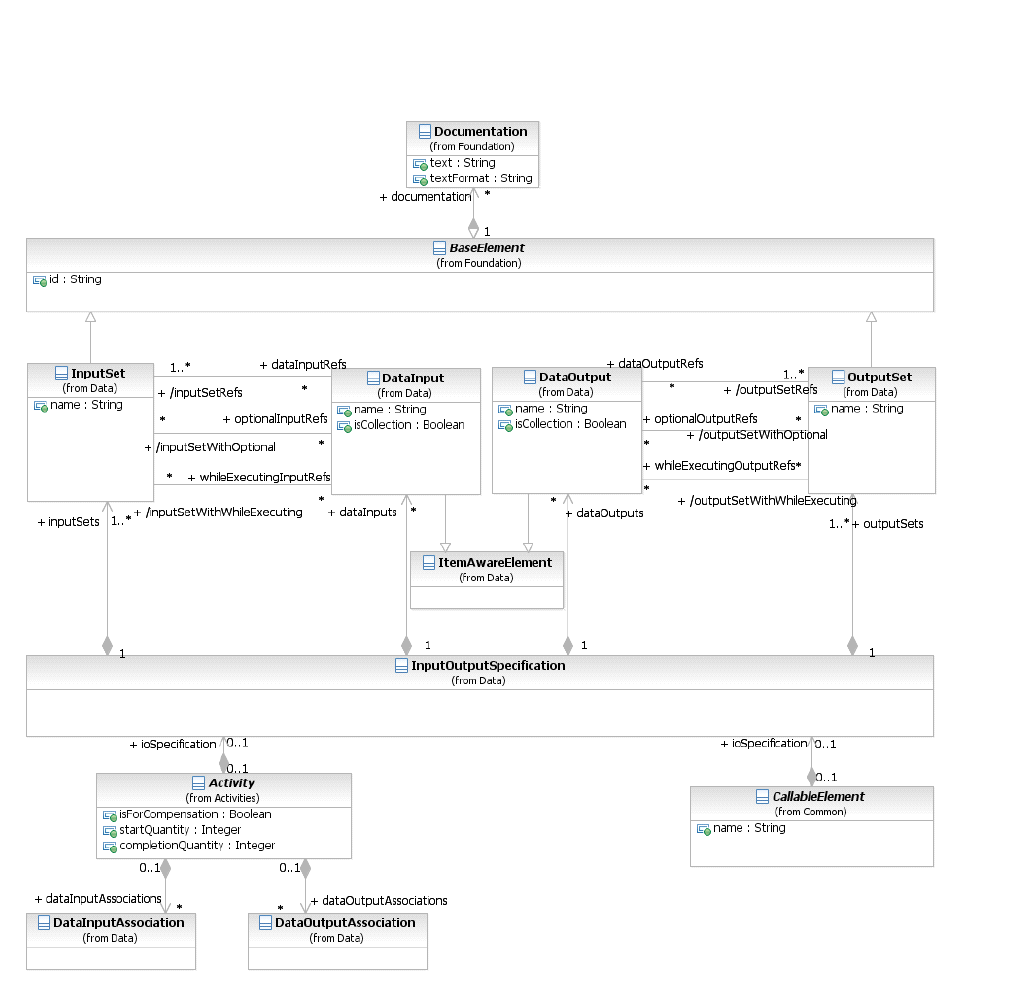
*Figure 10.57 – InputOutputSpecification class diagram* (p. 211)
The InputOutputSpecification element inherits the attributes and model associations of BaseElement (see Table 8.5). Figure 10.54 presents the additional attributes and model associations of the
**Table 10.58 – InputOutputSpecification Attributes and Model Associations**
| Attribute Name | Description/Usage |
| --- | --- |
| **inputSets:** InputSet [1..*] | A reference to the InputSets defined by the InputOutputSpecification. Every InputOutputSpecification MUST define at least one InputSet. |
| **outputSets:** OutputSet [1..*] | A reference to the OutputSets defined by the InputOutputSpecification. Every Data Interface MUST define at least one OutputSet. |
| **dataInputs:** DataInput [0..*] | An optional reference to the **Data Inputs** of the InputOutputSpecification. If the InputOutputSpecification defines no **Data Input**, it means no data is REQUIRED to start the **Activity**. This is an ordered set. |
| **dataOutputs:** DataOutput [0..*] | An optional reference to the **Data Outputs** of the InputOutputSpecification. If the InputOutputSpecification defines no **Data Output**, it means no data is REQUIRED to finish the **Activity**. This is an ordered set. |
#### Data Input
A **Data Input** is a declaration that a particular kind of data will be used as input of the InputOutputSpecification. There may be multiple **Data Inputs** associated with an
The **Data Input** is an item-aware element. **Data Inputs** are visually displayed on a **Process** diagram to show the inputs to the top-level **Process** or to show the inputs of a called **Process** (i.e., one that is referenced by a **Call Activity**, where the **Call Activity** has been expanded to show the called **Process** within the context of a calling **Process**). Visualized **Data Inputs** have the same notation as **Data Objects**, except that they MUST contain a small, unfilled block arrow (see Figure 10.58). **Data Inputs** MAY have *incoming* **Data Associations**:

*Figure 10.58 – A DataInput* (p. 213)
The “**optional**” attribute defines if a **DataInput** is valid even if the state is “**unavailable**.” The default value is *false*. If the value of this attribute is *true*, then the execution of the **Activity** will not begin until a value is assigned to the **DataInput** element, through the corresponding **Data Associations**.
#### States
**DataInput** elements can optionally reference a DataState element, which is the state of the data contained in the **DataInput**. The definition of these states, e.g., possible values, and any specific semantics are out of scope of this International Standard. Therefore, **BPMN** adopters can use the DataState element and the **BPMN** extensibility capabilities to define their states.
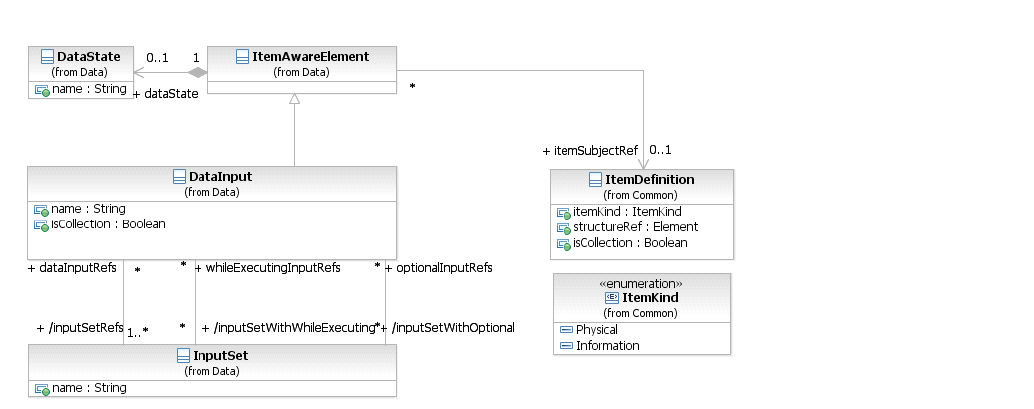
*Figure 10.59 – Data Input class diagram* (p. 213)
The **DataInput** element inherits the attributes and model associations of BaseElement (see Table 8.5) and ItemAwareElement (Table 10.52). Table 10.59 presents the additional attributes and model associations of the
**Table 10.59 – DataInput attributes and model associations**
| Attribute Name | Description/Usage |
| --- | --- |
| **name**: string [0..1] | A descriptive name for the element. |
| **inputSetRefs**: InputSet [1..*] | A DataInput is used in one or more InputSets. This attribute is derived from the InputSets. |
| **inputSetwithOptional**: InputSet [0..*] | Each InputSet that uses this DataInput can determine if the **Activity** can start executing with this DataInput state in “**unavailable**.” This attribute lists those InputSets. |
| **inputSetWithWhileExecuting**: Inputset [0..*] | Each InputSet that uses this DataInput can determine if the **Activity** can evaluate this DataInput while executing. This attribute lists those InputSets. |
| **isCollection**: boolean = false | Defines if the **DataInput** represents a collection of elements. It is needed when no itemDefinition is referenced. If an itemDefinition is referenced, then this attribute MUST have the same value as the isCollection attribute of the referenced itemDefinition. The default value for this attribute is *false*. |
#### Data Output
A **Data Output** is a declaration that a particular kind of data can be produced as output of the InputOutputSpecification. There MAY be multiple **Data Outputs** associated with a
The **Data Output** is an item-aware element. **Data Output** are visually displayed on a top-level **Process** diagram to show the outputs of the **Process** (i.e., one that is referenced by a Call Activity, where the **Call Activity** has been expanded to show the called **Process** within the context of a calling **Process**). Visualized **Data Outputs** have the same notation as **Data Objects**, except that they MUST contain a small, filled block arrow (see Figure 10.60). **Data Outputs** MAY have *outgoing* **DataAssociations**.

*Figure 10.60 – A Data Output* (p. 215)
#### States
**DataOutput** elements can optionally reference a DataState element, which is the state of the data contained in the **DataOutput**. The definition of these states, e.g., possible values, and any specific semantics are out of scope of this International Standard. Therefore, **BPMN** adopters can use the DataState element and the **BPMN** extensibility capabilities to define their states.
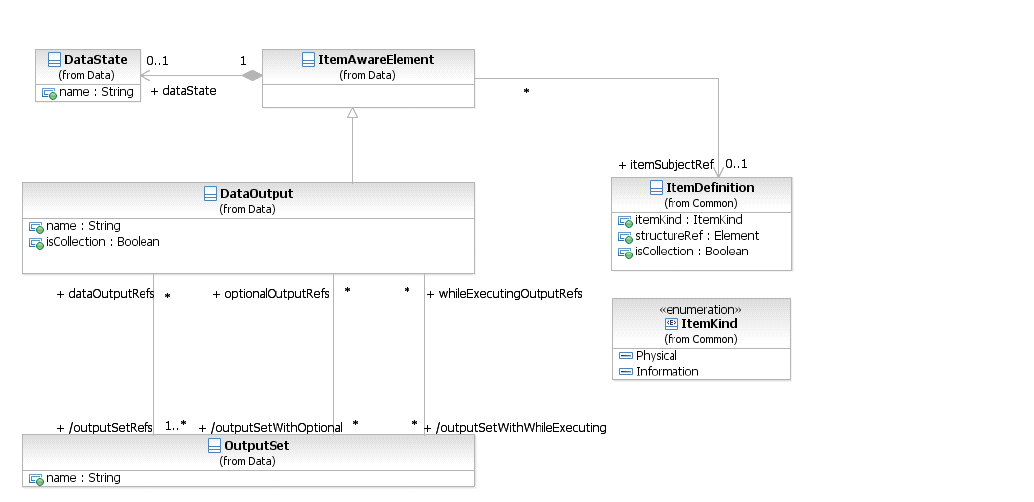
*Figure 10.61 – Data Output class diagram* (p. 215)
The DataOutput element inherits the attributes and model associations of BaseElement (see Table 8.5) and ItemAwareElement (Table 10.52). Table 10.60 presents the additional attributes and model associations of the
**Table 10.60 – DataOutput attributes and associations**
| Attribute Name | Description/Usage |
| --- | --- |
| **name**: string [0..1] | A descriptive name for the element. |
| **outputSetRefs**: OutputSet [1..*] | A DataOutput is used in one or more OutputSets. This attribute is derived from the OutputSets. |
| **outputSetwithOptional**: OutputSet | Each OutputSet that uses this DataOutput can determine if the |
| [0..*] | **Activity** can complete executing without producing this DataInput. This attribute lists those OutputSets. |
| **outputSetWithWhileExecuting**: OutputSet [0..*] | Each OutputSet that uses this DataInput can determine if the **Activity** can produce this **DataOutput** while executing. This attribute lists those OutputSets. |
| **isCollection**: boolean = false | Defines if the **DataOutput** represents a collection of elements. It is needed when no itemDefinition is referenced. If an itemDefinition is referenced, then this attribute MUST have the same value as the isCollection attribute of the referenced itemDefinition. The default value for this attribute is *false*. |
The following describes the mapping of data inputs and outputs to the specific **Activity** and **Event** implementations.
#### Service Task Mapping
If the **Service Task** is associated with an Operation, there MUST be a **Message Data Input** on the **Service Task** and it MUST have an itemDefinition equivalent to the one defined by the **Message** referred to by the inMessageRef attribute of the operation. If the operation defines output **Messages**, there MUST be a single **Data Output** and it MUST have an itemDefinition equivalent to the one defined by **Message** referred to by the
#### Send Task Mapping
If the **Send Task** is associated with a **Message**, there MUST be at most inputSet set and at most one **Data Input** on the **Send Task**. If the **Data Input** is present, it MUST have an itemDefinition equivalent to the one defined by the associated **Message**. If the **Data Input** is not present, the **Message** will not be populated with data at execution time.
#### Receive Task Mapping
If the **Receive Task** is associated with a **Message**, there MUST be at most outputSet set and at most one **Data Output** on the **Receive Task**. If the **Data Output** is present, it MUST have an itemDefinition equivalent to the one defined by the associated **Message**. If the **Data Output** is not present, the payload within the **Message** will not flow out of the **Receive Task** and into the **Process**.
#### User Task Mapping
**User Tasks** have access to the **Data Input**, **Data Output** and the data aware elements available in the scope of the
#### Call Activity Mapping
The DataInputs and DataOutputs of the **Call Activity** are mapped to the corresponding elements in the
#### Script Task Mapping
**Script Tasks** have access to the **Data Input**, **Data Output** and the data aware elements available in the scope of the
#### Events
If any of the EventDefinitions for the **Event** is associated with an element that has an ItemDefinition (such as a Message, Escalation, Error, or Signal), the following constraints apply:
- If the Event is associated with multiple EventDefinitions, there MUST be one Data Input (in the case of throw **Events**) or one **Data Output** (in the case of *catch* **Event**) for each EventDefinition. The order of the EventDefinitions and the order of the **Data Inputs/Outputs** determine which **Data Input/Output** corresponds with which EventDefinition.
- For each EventDefinition and Data Input/Output pair, if the Data Input/Output is present, it MUST have an ItemDefinition equivalent to the one defined by the Message, Escalation, Error, or Signal on the associated EventDefinition. In the case of a *throw* **Event**, if the **Data Input** is not present, the Message, Escalation, Error, or Signal will not be populated with data. In the case of a *catch* **Event**, if the **Data Output** is not present, the payload within the Message, Escalation, Error, or Signal will not flow out of the **Event** and into the **Process**.
#### InputSet
An InputSet is a collection of DataInput elements that together define a valid set of data inputs for an An InputSet MAY reference zero or more DataInput elements. A single DataInput MAY be associated with multiple InputSet elements, but it MUST always be referenced by at least one InputSet. An “empty” InputSet, one that references no DataInput elements, signifies that the **Activity** requires no data to start executing (this implies that either there are no data inputs or they are referenced by another input set). InputSet elements are contained by InputOutputSpecification elements; the order in which these elements are included defines the order in which they will be evaluated.
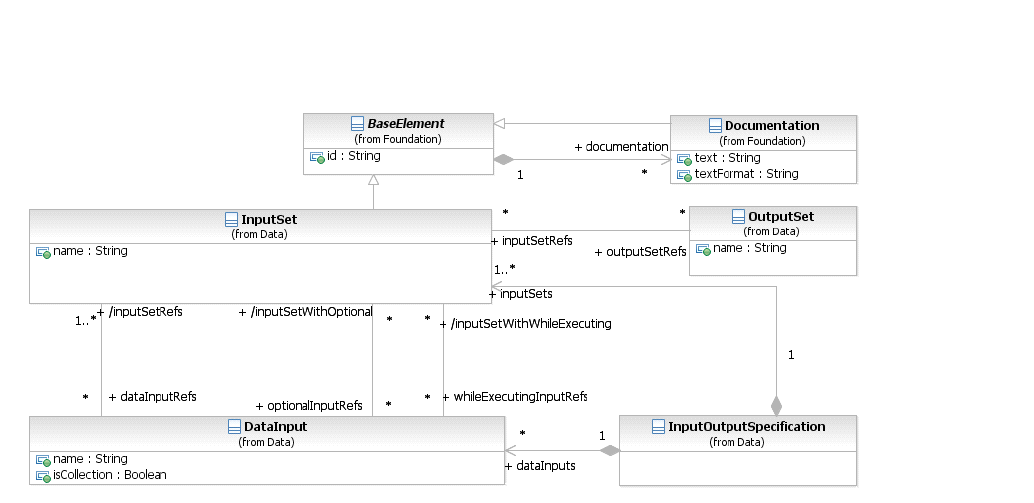
*Figure 10.62 – InputSet class diagram* (p. 218)
The InputSet element inherits the attributes and model associations of BaseElement (see Table 8.5). Table 10.61 presents the additional attributes and model associations of the InputSet element.
**Table 10.61 – InputSet attributes and model associations**
| Attribute Name | Description/Usage |
| --- | --- |
| **name**: string [0..1] | A descriptive name for the input set. |
| **dataInputRefs**: DataInput [0..*] | The DataInput elements that collectively make up this data requirement. |
| **optionalInputRefs**: DataInput | The DataInput elements that are a part of the InputSet that can be in the |
| [0..*] | state of “unavailable” when the **Activity** starts executing. This association MUST NOT reference a DataInput that is not listed in the dataInputRefs. |
| **whileExecutingInputRefs**: DataInput [0..*] | The elements that are a part of the that can be evalu-DataInput InputSet ated while the **Activity** is executing. This association MUST NOT reference a DataInput that is not listed in the dataInputRefs. |
| **outputSetRefs**: OutputSet [0..*] | Specifies an Input/Output rule that defines which OutputSet is expected to be created by the **Activity** when this InputSet became valid. This attribute is paired with the inputSetRefs attribute of OutputSets. This combination replaces the IORules attribute for **Activities** in **BPMN** 1.2. |
#### OutputSet
An OutputSet is a collection of DataOutputs elements that together can be produced as output from an **Activity** or MAY reference zero or more DataOutput elements. A single DataOutput MAY be associated with multiple OutputSet elements, but it MUST always be referenced by at least one OutputSet.
An “empty” OutputSet, one that is associated with no DataOutput elements, signifies that the **ACTIVITY** produces no data. The implementation of the element where the OutputSet is defined determines the OutputSet that will be produced. So it is up to the **Activity** implementation or the **Event**, to define which OutputSet will be produced.
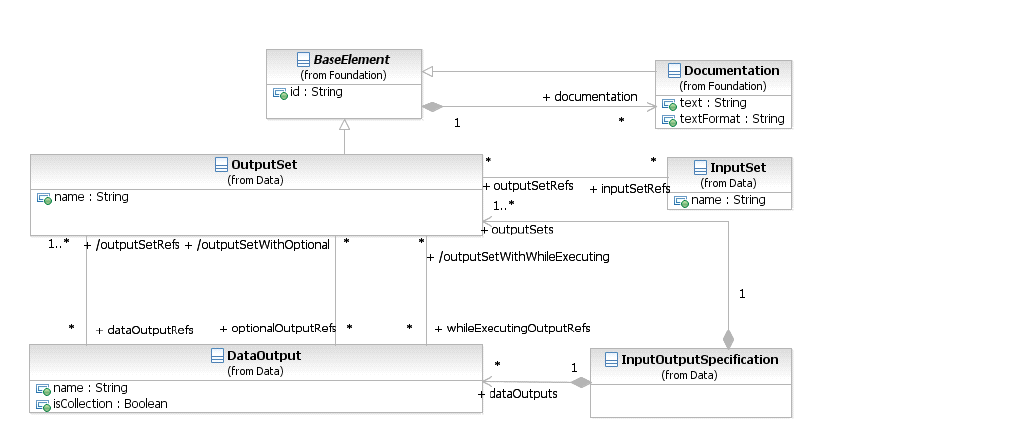
*Figure 10.63 – OutputSet class diagram* (p. 219)
The OutputSet element inherits the attributes and model associations of BaseElement (see Table 8.5). Table 10.62 presents the additional attributes and model associations of the OutputSet element.
**Table 10.62 – OutputSet attributes and model associations**
| Attribute Name | Description/Usage |
| --- | --- |
| **name**: string [0..1] | A descriptive name for the input set. |
| **dataOutputRefs**: DataOutput [0..*] | The DataOutput elements that MAY collectively be outputted. |
| **optionalOutputRefs**: DataOutput [0..*] | The DataOutput elements that are a part of the OutputSet that do not have to be produced when the **Activity** completes executing. This association MUST NOT reference a DataOutput that is not listed in the dataOutputRefs. |
| **whileExecutingOutputRefs**: DataOutput [0..*] | The elements that are a part of the that can DataOutput OutputSet be produced while the **Activity** is executing. This association MUST NOT reference a DataOutput that is not listed in the dataOutputRefs. |
| **inputSetRefs**: InputSet [0..*] | Specifies an Input/Output rule that defines which InputSet has to become valid to expect the creation of this OutputSet. This attribute is paired with the outputSetRefs attribute of InputSets. This combination replaces the IORules attribute for **Activities** in **BPMN** 1.2. |
#### Data Associations
**Data Associations** are used to move data between **Data Objects**, Properties, and *inputs* and *outputs* of **Activities**, **Processes**, and GlobalTasks. *Tokens* do not flow along a **Data Association**, and as a result they have no direct effect on the flow of the **Process**. The purpose of retrieving data from **Data Objects** or **Process Data Inputs** is to fill the **Activities** *inputs* and later push the *output* values from the execution of the **Activity** back into **Data Objects** or **Process Data Outputs**.
#### DataAssociation
The DataAssociation class is a BaseElement contained by an **Activity** or **Event**, used to model how data is pushed into or pulled from item-aware elements. DataAssociation elements have one or more sources and a target; the source of the association is copied into the target.
**DataAssociation** MUST have a transformation Expression that transforms the source ItemDefinition into the
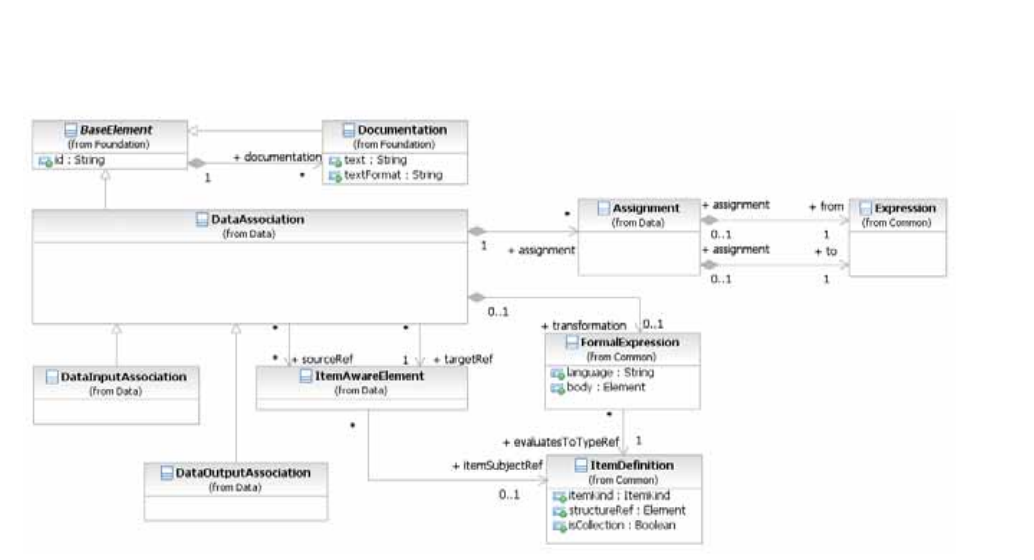
*Figure 10.64 – DataAssociation class diagram* (p. 221)
Optionally, **Data Associations** can be visually represented in the diagram by using the Association connector style (see Figure 10.65 and Figure 10.66).

*Figure 10.65 – A Data Association* (p. 221)
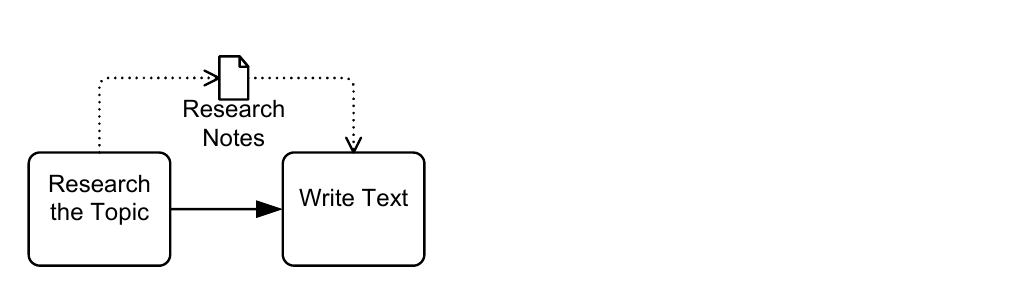
*Figure 10.66 – A Data Association used for an Outputs and Inputs into an Activities* (p. 221)
The core concepts of a DataAssociation are that they have sources, a target, and an optional transformation. When a data association is “executed,” data is copied to the target. What is copied depends if there is a transformation defined or not. If there is no transformation defined or referenced, then only one source MUST be defined, and the contents of this source will be copied into the target.
If there is a transformation defined or referenced, then this transformation Expression will be evaluated and the result of the evaluation is copied into the target. There can be zero (0) to many sources defined in this case, but there is no requirement that these sources are used inside the Expression. In any case, sources are used to define if the data association can be “executed,” if any of the sources is in the state of “unavailable,” then the data association cannot be executed, and the **Activity** or **Event** where the data association is defined MUST wait until this condition is met. **Data Associations** are always contained within another element that defines when these data associations are going to be executed. **Activities** define two sets of data associations, while **Events** define only one. For **Events**, there is only one set, but they are used differently for *catch* or *throw* **Events**. For a *catch* **Event**, data associations are used to push data from the **Message** received into **Data Objects** and properties. For a *throw* **Event**, data associations are used to fill the **Message** that is being thrown. As DataAssociations are used in different stages of the **Process** and **Activity** lifecycle, the possible sources and targets vary according to that stage. This defines the scope of possible elements that can be referenced as source and target. For example: when an **Activity** starts executing, the scope of valid targets include the **Activity** data inputs, while at the end of the **Activity** execution, the scope of valid sources include **Activity** data outputs. The DataAssociation element inherits the attributes and model associations of BaseElement (see Table 8.5). Table 10.63 presents the additional model associations of the DataAssociation element.
**Table 10.63 – DataAssociation model associations**
| Attribute Name | Description/Usage |
| --- | --- |
| **transformation**: Expression [0..1] | Specifies an optional transformation Expression. The actual scope of accessible data for that Expression is defined by the source and target of the specific **Data Association** types. |
| **assignment:** Assignment [0..*] | Specifies one or more data elements Assignments. By using an Assignment, single data structure elements can be assigned from the source structure to the target structure. |
| **sourceRef**: ItemAwareElement | Identifies the source of the **Data Association**. The source MUST be an |
| [0..*] | ItemAwareElement. |
| **targetRef**: ItemAwareElement | Identifies the target of the **Data Association**. The target MUST be an ItemAwareElement. |
#### Assignment
The Assignment class is used to specify a simple mapping of data elements using a specified Expression language. The default Expression language for all Expressions is specified in the Definitions element, using the expressionLanguage attribute. It can also be overridden on each individual Assignment using the same attribute. The Assignment element inherits the attributes and model associations of BaseElement (see Table 8.5). Table 10.64 presents the additional attributes of the Assignment element.
**Table 10.64 – Assignment attributes**
| Attribute Name | Description/Usage |
| --- | --- |
| **from**: Expression | The Expression that evaluates the source of the Assignment. |
| to: Expression | The Expression that defines the actual Assignment operation and the target data element. |
#### DataInputAssociation
contained in an **Activity**. The source of such a **DataAssociation** can be every ItemAwareElement accessible in the current scope, e.g., a **Data Object**, a Property, or an Expression. The DataInputAssociation element inherits the attributes and model associations of DataAssociation (see Table 10.64), but does not contain any additional attributes or model associations.
#### DataOutputAssociation
The DataOutputAssociation can be used to associate a DataOutput contained within an **ACTIVITY** with any ItemAwareElement accessible in the scope the association will be executed in. The target of such a **DataAssociation** can be every ItemAwareElement accessible in the current scope, e.g., a **Data Object**, a
The DataOutputAssociation element inherits the attributes and model associations of DataAssociation (see Table 10.64), but does not contain any additional attributes or model associations.
#### Data Objects associated with a Sequence Flow
Figure 10.67 repeats Figure 10.66, above, and shows how **Data Associations** are used to represent inputs and outputs
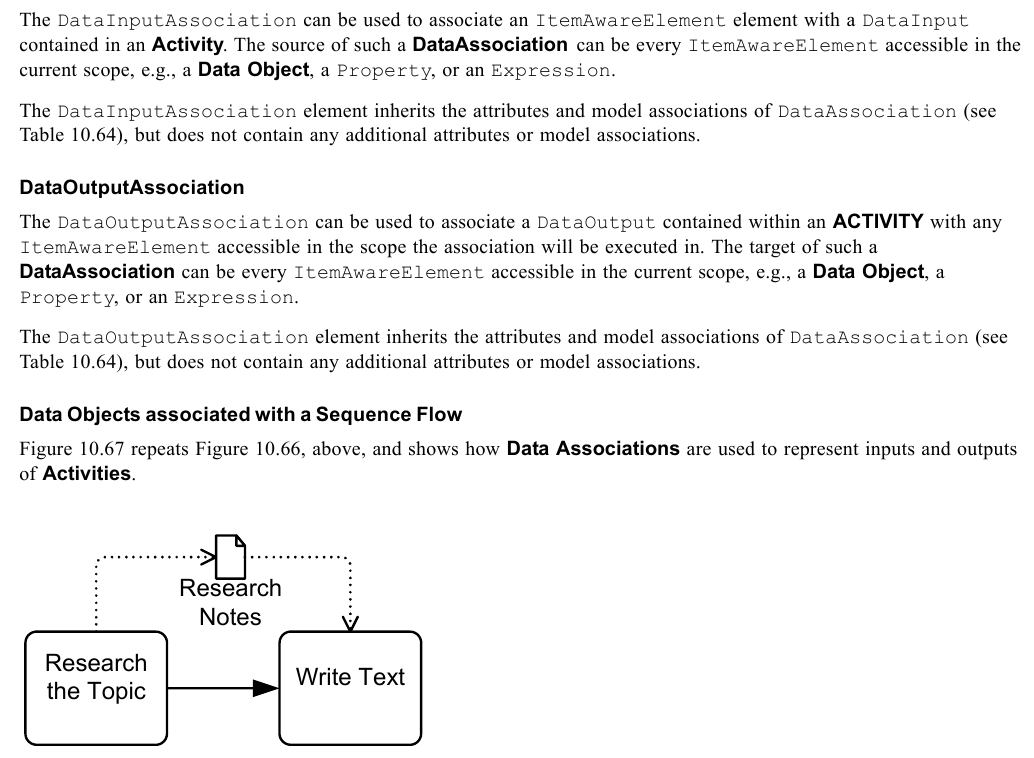
*Figure 10.67 – A Data Object shown as an output and an inputs* (p. 223)
Alternatively, **Data Objects** MAY be directly associated with a **Sequence Flow** connector (see Figure 10.68) to represent the same input/output relationships. This is a visual short cut that normalizes two **Data Associations** (e.g., as seen in Figure 10.67): one from an item-aware element (e.g., an **Activity**) contained by the source of the **Sequence Flow**, connecting to the **Data Object**; and the other from the **Data Object** connecting to a item-aware element contained by the target of the **Sequence Flow**.
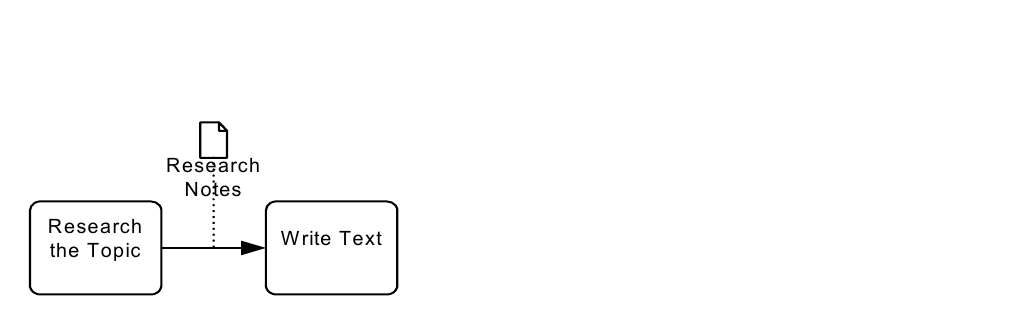
*Figure 10.68 – A Data Object associated with a Sequence Flow* (p. 224)
### 10.4.2 Execution Semantics for Data
When an element that defines an InputOutputSpecification is ready to begin execution by means of **Sequence Flow** or **Event** being caught, the inputs of the interface are filled with data coming from elements in the context, such as **Data Objects** or Properties. The way to represent these assignments is the **Data Association** elements. Each defined InputSet element will be evaluated in the order they are included in the InputOutputSpecification. For each InputSet, the data inputs it references will be evaluated if it is valid. All data associations that define as target the data input will be evaluated, and if any of the sources of the data association is “**unavailable**,” then the InputSet is “**unavailable**” and the next InputSet is evaluated. The first InputSet where all data inputs are “available” (by means of data associations) is used to start the execution of the **Activity**. If no InputSet is “available,” then the execution will wait until this condition is met. The time and frequency of when and how often this condition is evaluated is out of scope for this International Standard. Implementations will wait for the sources of data associations to become available and then re-evaluate the InputSets. In the case of *throw* and *catch* **Events**, given their nature, the execution semantics for data is different. When a *throw* **Event** is activated, all DataInputAssociations of the event are executed, filling the **Data Inputs** of the **Event**. Finally, DataInputs are then copied to the elements thrown by the **Event** (**Messages**, **Signals**, etc.). Since there are no InputSets defined for **Events**, the execution will never wait. When a *catch* **Event** is activated, **Data Outputs** of the event are filled with the element that triggered the **Event**. Then all DataOutputAssociations of the **Event** are executed. There are no OutputSets defined for **Events**. To allow invoking a **Process** from both a **Call Activity** and via **Message Flow**, the **Start Event** and **End Event** support an additional case. In the case of a **Start Event**, the **Data Inputs** of the enclosing process are available as targets to the DataOutputAssociations of the **Event**. This way the **Process Data Inputs** can be filled using the elements that triggered the **Start Event**. In the case of an **End Event**, the **Data Outputs** of the enclosing process are available as sources to the DataInputAssociations of the **Event**. This way the resulting elements of the **End Event** can use the **Process Data Outputs** as sources.
Once an InputSet becomes “available,” all **Data Associations** whose target is any of the **Data Inputs** of the InputSet are executed. These executions fill the Activity **Data Inputs** and the execution of the **Activity** can begin. When an **Activity** finishes execution, all **Data Associations** whose sources are any of the **Data Outputs** of the OutputSet are executed. These executions copy the values from the **Data Outputs** back to the container’s context (**Data Object**, Properties, etc.).
#### Execution Semantics for DataAssociation
The execution of any **Data Associations** MUST follow these semantics:
- If the Data Association specifies a “transformation” Expression, this expression is evaluated and the result is copied to the targetRef. This operation replaces completely the previous value of the targetRef element.
- For each “assignment” element specified: Evaluate the Assignment’s “from” expression and obtain the *source value*. Evaluate the Assignment’s “to” expression and obtain the *target element*. The *target element* can be any element in the context or a sub-element of it (e.g., a DataObject or a sub-element of it). Copy the *source value* to the *target element*.
- If no “transformation” Expression nor any “assignment” elements are defined in the Data Association: Copy the Data Association “sourceRef” value into the “targetRef.” Only one sourceRef element is allowed in this case.
### 10.4.3 Usage of Data in XPath Expressions
**BPMN** extensibility mechanism enables the usage of various languages for Expressions and queries. This sub clause describes how XPath is used in **BPMN**. It introduces a mechanism to access **BPMN Data Objects**, **BPMN** *Properties*, and various *instance* attributes from XPath Expressions. The accessibility by the Expression language is defined based on the entities accessibility by the **Activity** that contains the Expression. All elements accessible from the enclosing element of an XPath Expression MUST be made available to the XPath processor. **BPMN Data Objects** and **BPMN** *Properties* are defined using ItemDefinition. The XPath binding assumes that the ItemDefinition is either an XSD complex type or an XSD element. If XSD element is used, it MUST be manifested as a node-set XPath variable with a single member node. If XSD complex type is used, it MUST be manifested as a node-set XPath variable with one member node containing the anonymous document element that contains the actual value of the **BPMN Data Object** or *Property*.
#### Access to BPMN Data Objects
Table 10.65 introduces an XPath function used to access **BPMN Data Objects**. Argument processName names **Process** and is of type string. Argument dataObjectName names **Data Object** and is of type string. It MUST be a literal string.
**Table 10.65 – XPath Extension Function for Data Objects**
| XPath Extension Function | Description/Usage |
| --- | --- |
| **Element getDataObject** (‘processName’, ‘dataObjectName’) | This extension function returns value of submitted **Data Object**. Argument processName is optional. If omitted, the process enclosing the **Activity** that contains the Expression is assumed. In order to access **Data Objects** defined in a parent process the processName MUST be used. Otherwise it MUST be omitted. |
Because XPath 1.0 functions do not support returning faults, an empty node set is returned in the event of an error.
#### Access to BPMN Data Input and Data Output
Table 10.66 introduces XPath functions used to access **BPMN Data Inputs** and **BPMN Data Outputs**. Argument dataInputName names a **Data Input** and is of type string. Argument dataOutput names a **Data Output** and is of type string.
**Table 10.66 – XPath Extension Function for Data Inputs and Data Outputs**
| XPath Extension Function | Description/Usage |
| --- | --- |
| **Element getDataInput** (‘dataInputName’) | This extension function returns the value of the submitted **Data Input**. |
| **Element getDataOutput** ('dataOutputName') | This extension function returns the value of the submitted **Data Output**. |
#### Access to BPMN Properties
Table 10.67 introduces XPath functions used to access **BPMN** *Properties*. Argument processName names **Process** and is of type string. Argument propertyName names property and is of type string. Argument activityName names **Activity** and is of type string. Argument eventName names **Event** and is of type string. These strings MUST be literal strings. The XPath extension functions return value of the submitted property. Because XPath 1.0 functions do not support returning faults, an empty node set is returned in the event of an error.
**Table 10.67 – XPath Extension Functions for Properties**
| XPath Extension Function | Description/Usage |
| --- | --- |
| **Element getProcessProperty** (‘processName’, ‘propertyName’) | This extension function returns value of submitted **Process** property. Argument processName is optional. If omitted, the **Process** enclosing the **Activity** that contains the Expression is assumed. In order to access Properties defined in a parent **Process** the processName MUST be used. Otherwise it MUST be omitted. |
| **Element getActivityProperty** (‘activityName’, ‘propertyName’) | This extension function returns value of submitted **Activity** property. |
| **Element getEventProperty** ‘eventName’, ‘propertyName’) | This extension function returns value of submitted **Event** property. |
#### For BPMN Instance Attributes
Table 10.68 introduces XPath functions used to access **BPMN** *instance Attributes*. Argument processName names **Process** and is of type string. Argument attributeName names *instance* attribute and is of type string. Argument activityName names **Activity** and is of type string. These strings MUST be literal strings. These functions return value of the submitted *instance* **Activity**. Because XPath 1.0 functions do not support returning faults, an empty node set is returned in the event of an error.
**Table 10.68 – XPath extension functions for instance attributes**
| XPath Extension Function | Description/Usage |
| --- | --- |
| **Element getProcessInstanceAttribute** (‘processName’,‘attributeName’) | This extension function returns value of submitted **Process** *instance* attribute. Argument processName is optional. If omitted, the **Process** enclosing the **Activity** that contains the Expression is assumed. In order to access *instance* Attributes of a parent **Process** the processName MUST be used. Otherwise it MUST be omitted. |
| **Element getChoreographyInstance-** | This extension function returns value of submitted **Choreography** |
| **Attribute** (‘attributeName’) | *instance* attribute. |
| **Element getActivityInstanceAttribute** (‘activityName’, ‘attributeName’) | This extension function returns value of submitted **Activity** *instance* attribute. **User Task** and loop are examples of **Activities**. |
### 10.4.4 XML Schema for Data
**Table 10.69 – Assignment XML schema**
```xml
```
**Table 10.70 – DataAssociation XML schema**
```xml
```
**Table 10.71 – DataInput XML schema**
```xml
```
**Table 10.72 – DataInputAssociation XML schema**
```xml
```
**Table 10.73 – DataObject XML schema**
```xml
```
**Table 10.74 – DataState XML schema**
```xml
```
**Table 10.75 – DataOutput XML schema**
```xml
```
**Table 10.76 – DataOutputAssociation XML schema**
```xml
```
**Table 10.77 – InputOutputSpecification XML schema**
```xml
```
**Table 10.78 – InputSet XML schema**
```xml
```
**Table 10.79 – OutputSet XML schema**
```xml
```
**Table 10.80 – Property XML schema**
```xml
```