---
title: "10.6 Gateways"
chapter: "10 Process"
source: "OMG BPMN 2.0.2 — formal/2013-12-09"
pages: "286-301"
---
> 10 Process · páginas 286-301 · [índice](../README.md)
## 10.6 Gateways
**Gateways** are used to control how **Sequence Flows** interact as they converge and diverge within a **Process**. If the flow does not need to be controlled, then a **Gateway** is not needed. The term “Gateway” implies that there is a gating mechanism that either allows or disallows passage through the **Gateway**. As *tokens* arrive at a **Gateway** they can be merged together on input and/or split apart on output as the **Gateway** mechanisms are invoked. A **Gateway** is a diamond, which has been used in many flow chart notations for exclusive branching and is familiar to most modelers. A **Gateway** is a diamond that MUST be drawn with a single thin line (see Figure 10.102).

*Figure 10.102 – A Gateway* (p. 286)
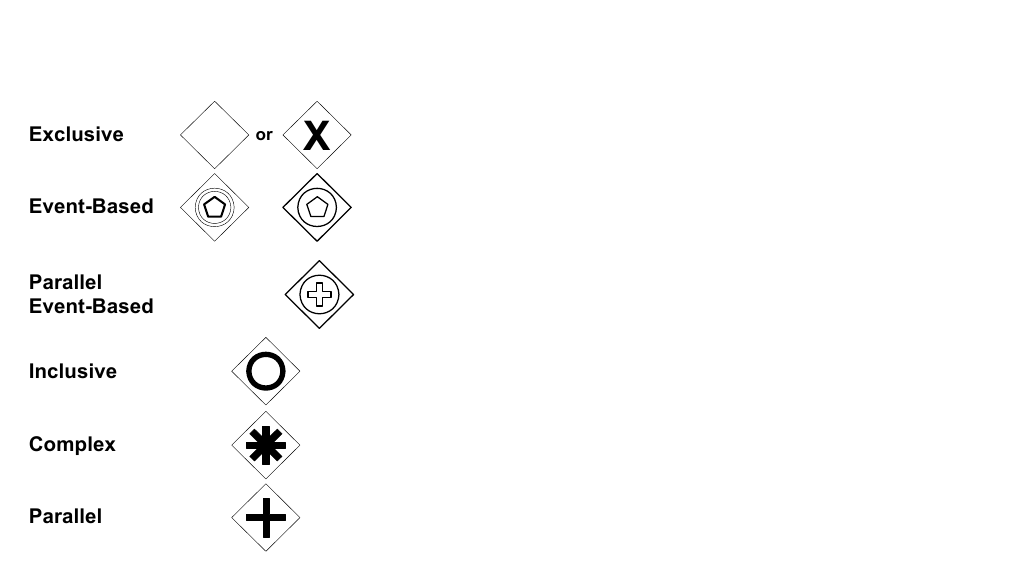
*Figure 10.103 – The Different types of Gateways* (p. 287)
The **Gateway** controls the flow of both diverging and converging **Sequence Flows**. That is, a single **Gateway** could have multiple input and multiple output flows. Modelers and modeling tools might want to enforce a best practice of a **Gateway** only performing one of these functions. Thus, it would take two sequential **Gateways** to first converge and then to diverge the **Sequence Flows**.
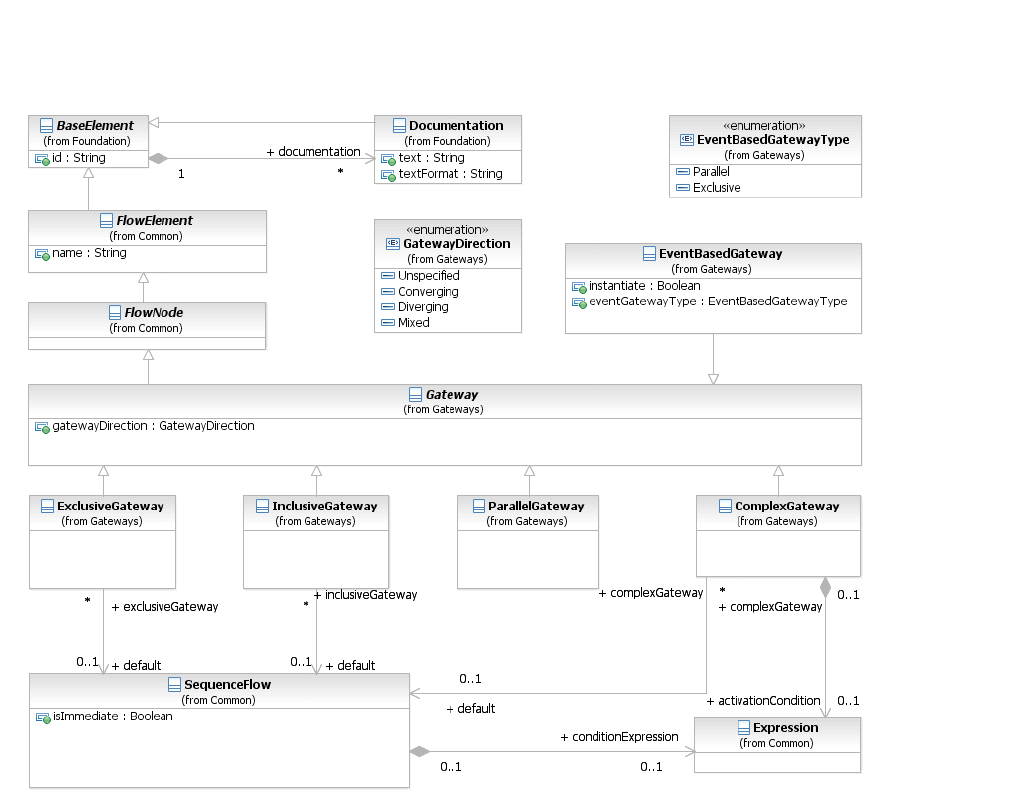
*Figure 10.104 – Gateway class diagram* (p. 288)
**Gateways** are described in this sub clause on an abstract level. The execution semantics of **Gateways** is detailed on page 434.
### 10.6.1 Sequence Flow Considerations
**NOTE:** Although the shape of a **Gateway** is a diamond, it is not a requirement that *incoming* and *outgoing* **Sequence Flows** MUST connect to the corners of the diamond. **Sequence Flows** can connect to any position on the boundary of the **Gateway** shape. This sub clause applies to all **Gateways**. Additional **Sequence Flow** Connection rules are specified for each type of **Gateway** in the sub clauses below. A **Gateway** MAY be a target for a **Sequence Flow**. It can have zero (0), one (1), or more *incoming*
A **Gateway** MAY be a source of a **Sequence Flow**; it can have zero, one, or more *outgoing* **Sequence** A **Gateway** MUST have either multiple *incoming* **Sequence Flows** or multiple *outgoing* **Sequence Flows** (i.e., it MUST merge or split the flow).
### 10.6.2 Exclusive Gateway
A diverging **Exclusive Gateway (Decision)** is used to create alternative paths within a **Process** flow. This is basically the “diversion point in the road” for a **Process**. For a given *instance* of the **Process**, only one of the paths can be taken. A Decision can be thought of as a question that is asked at a particular point in the **Process**. The question has a defined set of alternative answers. Each answer is associated with a condition Expression that is associated with a **Gateway’s** *outgoing* **Sequence Flows**. The **Exclusive Gateway** MAY use a marker that is shaped like an “X” and is placed within the **Gateway** diamond (see Figure 10.106) to distinguish it from other **Gateways**. This marker is NOT REQUIRED (see Figure 10.105).
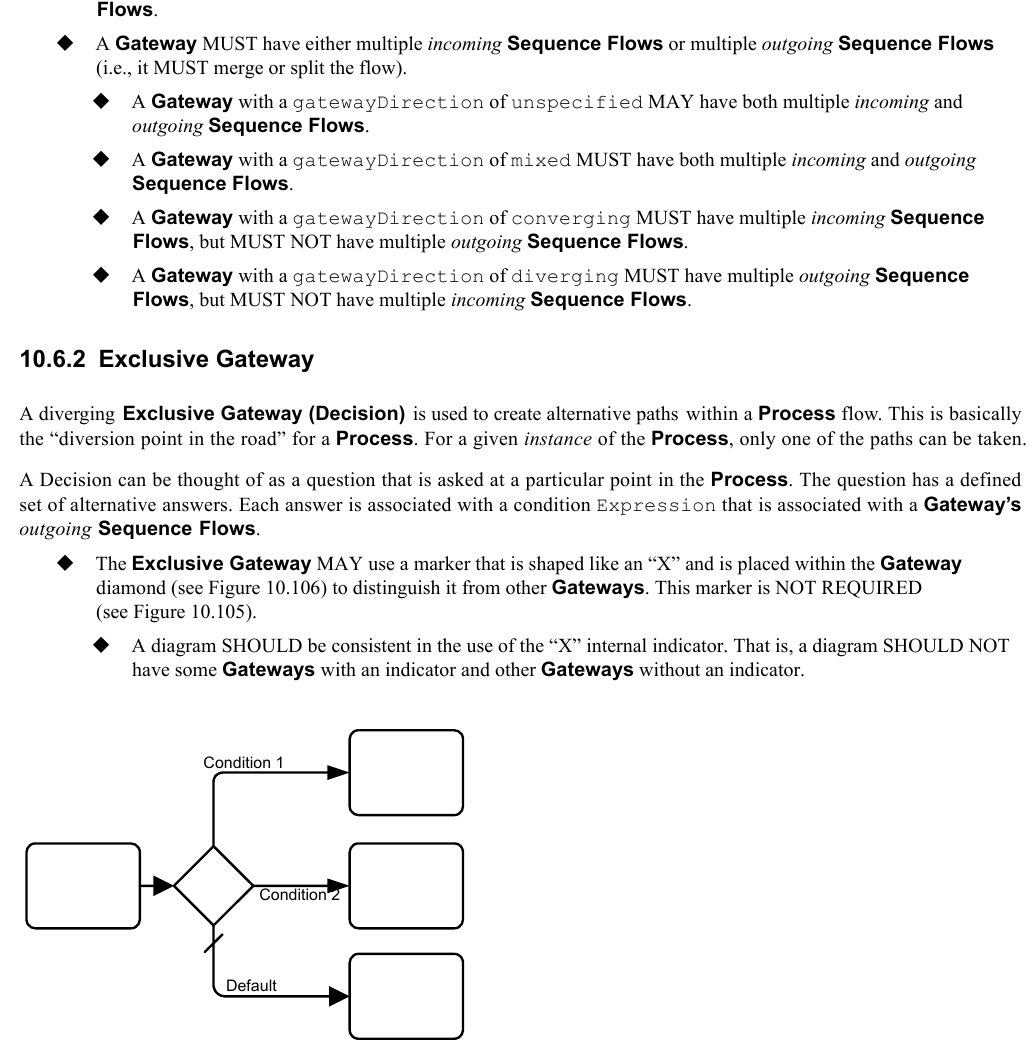
*Figure 10.105 – An Exclusive Data-Based Decision (Gateway) Example without the Internal Indicator* (p. 289)
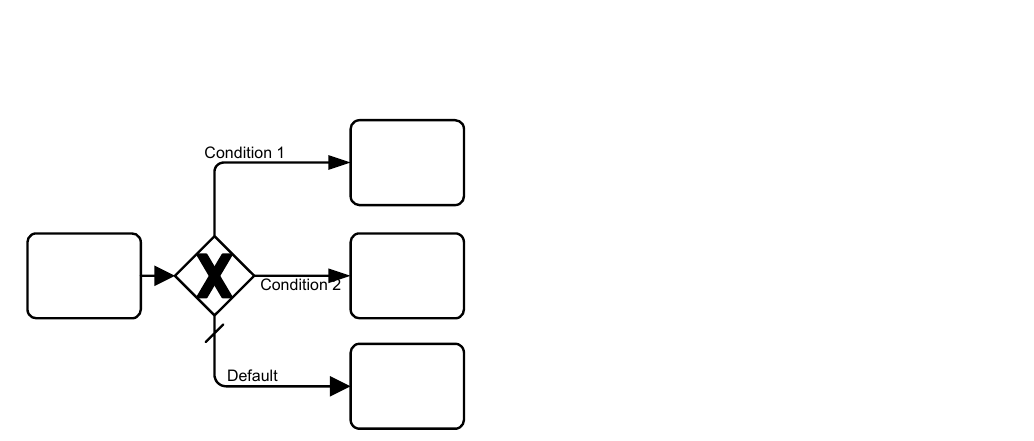
*Figure 10.106 – A Data-Based Exclusive Decision (Gateway) Example with the Internal Indicator* (p. 290)
**NOTE:** as a modeling preference, the **Exclusive Gateways** shown in examples within this document will be shown without the internal indicator. A default path can optionally be identified, to be taken in the event that none of the conditional Expressions evaluate to *true*. If a default path is not specified and the **Process** is executed such that none of the conditional Expressions evaluates to *true*, a runtime exception occurs. A converging **Exclusive Gateway** is used to merge alternative paths. Each *incoming* **Sequence Flow** *token* is routed to the *outgoing* **Sequence Flow** without synchronization.
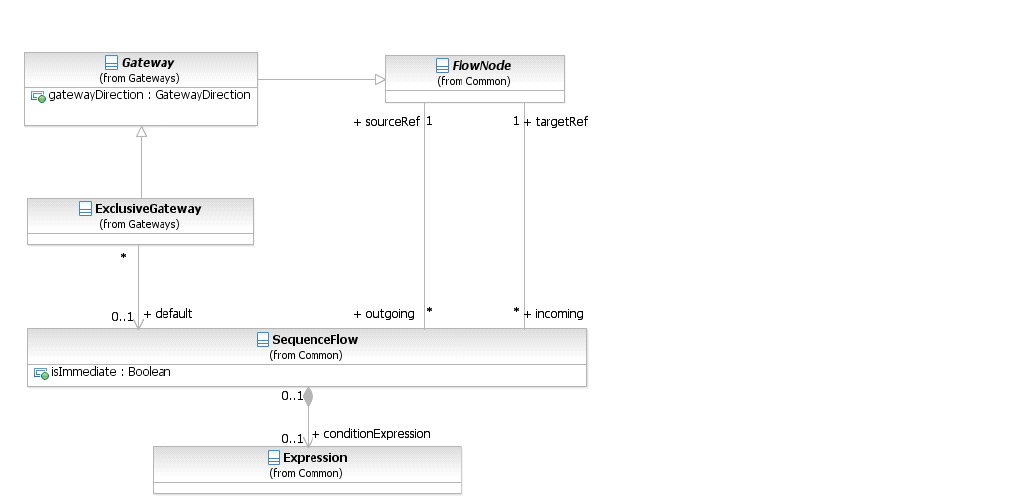
*Figure 10.107 – Exclusive Gateway class diagram* (p. 290)
The **Exclusive Gateway** element inherits the attributes and model associations of **Gateway** (see Table 8.46). Table 10.123 presents the additional attributes and model associations of the **Exclusive Gateway** element.
**Table 10.123 – ExclusiveGateway Attributes & Model Associations**
| Attribute Name | Description/Usage |
| --- | --- |
| **default**: SequenceFlow [0..1] | The **Sequence Flow** that will receive a *token* when none of the conditionExpressions on other *outgoing* **Sequence Flows** evaluate to *true*. The *default* **Sequence Flow** should not have a conditionExpression. Any such Expression SHALL be ignored. |
### 10.6.3 Inclusive Gateway
A diverging **Inclusive Gateway** (Inclusive Decision) can be used to create alternative but also parallel paths within a **Process** flow. Unlike the **Exclusive Gateway**, all condition Expressions are evaluated. The *true* evaluation of one condition Expression does not exclude the evaluation of other condition Expressions. All **Sequence Flows** with a *true* evaluation will be traversed by a *token*. Since each path is considered to be independent, all combinations of the paths MAY be taken, from zero to all. However, it should be designed so that at least one path is taken. The **Inclusive Gateway** MUST use a marker that is in the shape of a circle or an “O” and is placed within the **Gateway** diamond (see Figure 10.108) to distinguish it from other **Gateways**.

*Figure 10.108 – An example using an Inclusive Gateway* (p. 291)
A default path can optionally be identified, to be taken in the event that none of the conditional Expressions evaluate to *true*. If a default path is not specified and the **Process** is executed such that none of the conditional Expressions evaluates to *true*, a runtime exception occurs. A converging **Inclusive Gateway** is used to merge a combination of alternative and parallel paths. A control flow *token* arriving at an **Inclusive Gateway** MAY be synchronized with some other *tokens* that arrive later at this **Gateway**. The precise synchronization behavior of the **Inclusive Gateway** can be found on page 291.
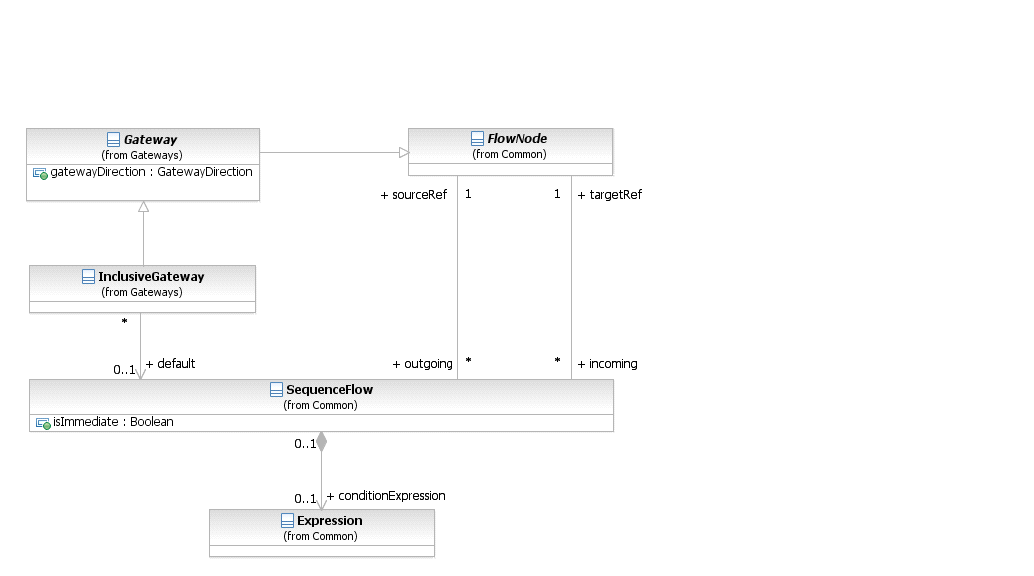
*Figure 10.109 – Inclusive Gateway class diagram* (p. 292)
The **Inclusive Gateway** element inherits the attributes and model associations of **Gateway** (see Table 8.46). Table 10.124 presents the additional attributes and model associations of the **Inclusive Gateway** element.
**Table 10.124 – InclusiveGateway Attributes & Model Associations**
| Attribute Name | Description/Usage |
| --- | --- |
| **default**: SequenceFlow [0..1] | The **Sequence Flow** that will receive a *token* when none of the conditionExpressions on other **Sequence Flows** evaluate to *true*. The *default* **Sequence Flow** should not have a conditionExpression. Any such Expression SHALL be ignored. |
### 10.6.4 Parallel Gateway
A **Parallel Gateway** is used to synchronize (combine) parallel flows and to create parallel flows. The **Parallel Gateway** MUST use a marker that is in the shape of a plus sign and is placed within the **Gateway** diamond (see Figure 10.110) to distinguish it from other **Gateways**.
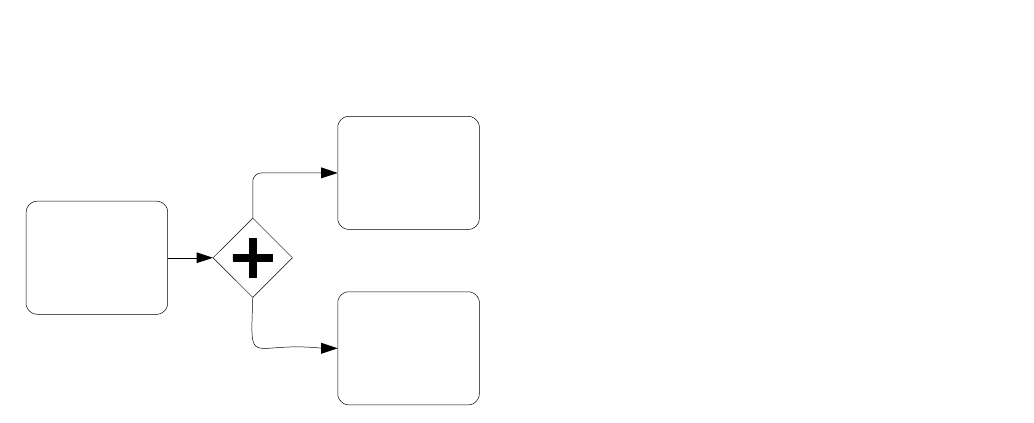
*Figure 10.110 – An example using an Parallel Gateway* (p. 293)
**Parallel Gateways** are used for synchronizing parallel flow (see Figure 10.111).
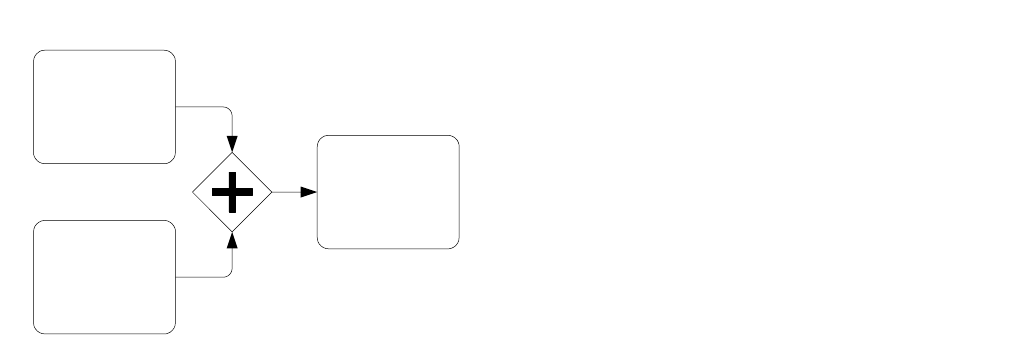
*Figure 10.111 – An example of a synchronizing Parallel Gateway* (p. 293)
A **Parallel Gateway** creates parallel paths without checking any conditions; each *outgoing* **Sequence Flow** receives a *token* upon execution of this **Gateway**. For *incoming* flows, the **Parallel Gateway** will wait for all *incoming* flows before triggering the flow through its *outgoing* **Sequence Flows**.
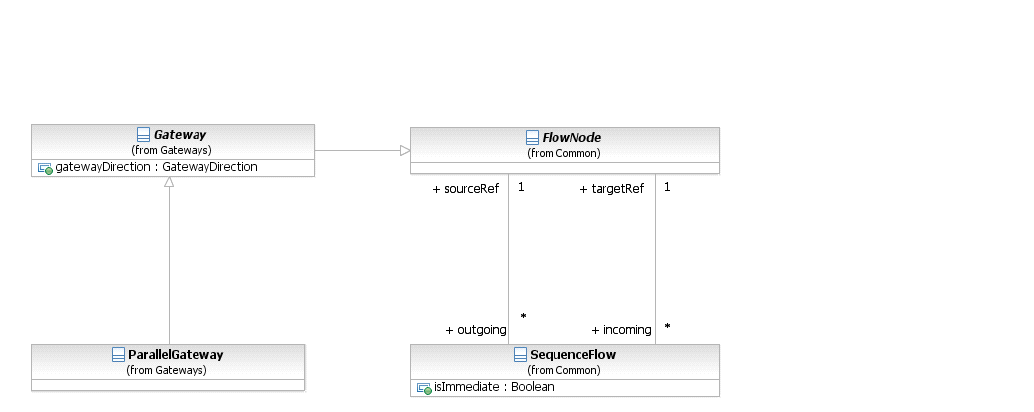
*Figure 10.112 – Parallel Gateway class diagram* (p. 294)
The **Parallel Gateway** element inherits the attributes and model associations of **Gateway** (see Table 8.46), but adds no additional attributes or model associations.
### 10.6.5 Complex Gateway
The **Complex Gateway** can be used to model complex synchronization behavior. An Expression activationCondition is used to describe the precise behavior. For example, this Expression could specify that *tokens* on three out of five *incoming* **Sequence Flows** are needed to activate the **Gateway**. What *tokens* are produced by the **Gateway** is determined by conditions on the *outgoing* **Sequence Flows** as in the split behavior of the **Inclusive Gateway**. If *tokens* arrive later on the two remaining **Sequence Flows**, those *tokens* cause a reset of the **Gateway** and new *token* can be produced on the *outgoing* **Sequence Flows**. To determine whether it needs to wait for additional *tokens* before it can reset, the **Gateway** uses the synchronization semantics of the **Inclusive Gateway**. The **Complex Gateway** MUST use a marker that is in the shape of an asterisk and is placed within the **Gateway** diamond (see Figure 10.113) to distinguish it from other **Gateways**.
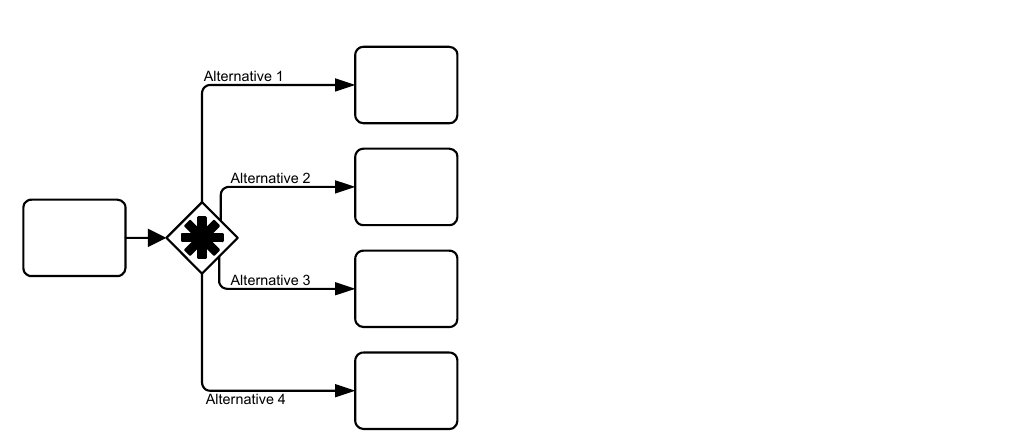
*Figure 10.113 – An example using a Complex Gateway* (p. 294)
The **Complex Gateway** has, in contrast to other **Gateways**, an internal state, which is represented by the boolean *instance* attribute waitingForStart, which is initially *true* and becomes *false* after activation. This attribute can be used in the conditions of the *outgoing* **Sequence Flows** to specify where *tokens* are produced upon activation and where *tokens* are produced upon reset. It is RECOMMENDED that each *outgoing* **Sequence Flow** either get a *token* upon activation or upon reset but not both. At least one *outgoing* **Sequence Flow** should receive a *token* upon activation but a *token* MUST NOT be produced upon reset. Figure 10.114 shows the class diagram for the **Complex Gateway**.
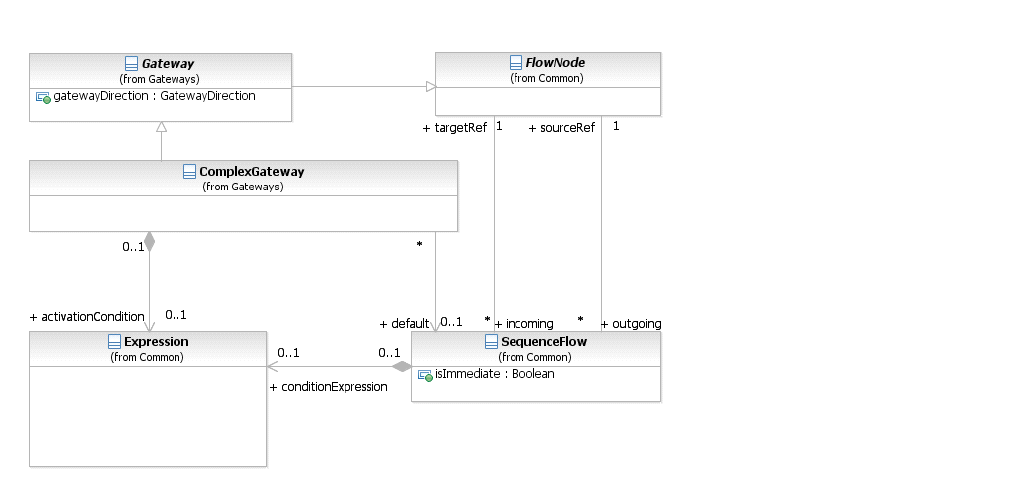
*Figure 10.114 – Complex Gateway class diagram* (p. 295)
The **Complex Gateway** element inherits the attributes and model associations of **Gateway** (see Table 8.46). Table 10.125 presents the additional model associations of the **Complex Gateway** element.
**Table 10.125 – Complex Gateway model associations**
| Attribute Name | Description/Usage |
| --- | --- |
| **activationCondition**: Expression | Determines which combination of *incoming* *tokens* will be synchronized for |
| [0..1] | activation of the **Gateway**. |
| **default**: SequenceFlow [0..1] | The **Sequence Flow** that will receive a *token* when none of the conditionExpressions on other **Sequence Flows** evaluate to *true*. The *default* **Sequence Flow** should not have a conditionExpression. Any such Expression SHALL be ignored. |
**Table 10.126 – Instance attributes related to the Complex Gateway**
| Attribute Name | Description/Usage |
| --- | --- |
| **activationCount**: integer | Refers at runtime to the number of *tokens* that are present on an *incoming* **Sequence Flow** of the **Complex Gateway**. |
| **waitingForStart**: boolean = true | Represents the internal state of the **Complex Gateway**. It is either waiting for start (=*true*) or waiting for reset (=*false*). |
### 10.6.6 Event-Based Gateway
The **Event-Based Gateway** represents a branching point in the **Process** where the alternative paths that follow the **Gateway** are based on **Events** that occur, rather than the evaluation of Expressions using **Process** data (as with an **Exclusive** or **Inclusive Gateway**). A specific **Event**, usually the receipt of a **Message**, determines the path that will be taken. Basically, the *decision* is made by another *Participant*, based on data that is not visible to **Process**, thus, requiring the use of the **Event-Based Gateway**. For example, if a company is waiting for a response from a customer they will perform one set of **Activities** if the customer responds “Yes” and another set of **Activities** if the customer responds “No.” The customer’s response determines which path is taken. The identity of the **Message** determines which path is taken. That is, the “Yes” **Message** and the “No” **Message** are different **Messages**—i.e., they are not the same **Message** with different values within a property of the **Message**. The receipt of the **Message** can be modeled with an **Intermediate Event** with a **Message** *trigger* or a **Receive Task**. In addition to **Messages**, other *triggers* for **Intermediate Events** can be used, such as Timers. The **Event Gateway** shares the same basic shape of the **Gateways**, a diamond, with a marker placed within the diamond to indicate variations of the **Gateway**. An **Event Gateway** is a diamond that MUST be drawn with a single thin line.
The marker for the **Event Gateway** MUST look like a *catch* **Multiple Intermediate Event** (see Figure 10.115).
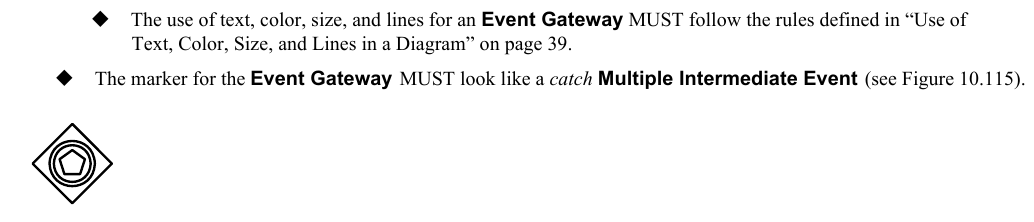
*Figure 10.115 – Event-Based Gateway* (p. 296)
Unlike other **Gateways**, the behavior of the **Event Gateway** is determined by a configuration of elements, rather than the single **Gateway**. An **Event Gateway** MUST have two or more *outgoing* **Sequence Flows**.
The objects that are on the target end of the **Gateway’s** *outgoing* **Sequence Flows** are part of the configuration of the
**Event-Based Gateways** are configured by having *outgoing* **Sequence Flows** target an **Intermediate Event** or a **Receive Task** in any combination (see Figure 10.116 and Figure 10.117) except that:
- Target elements in an **Event Gateway** configuration MUST NOT have any additional *incoming* **Sequence Flows** (other than that from the **Event Gateway**).
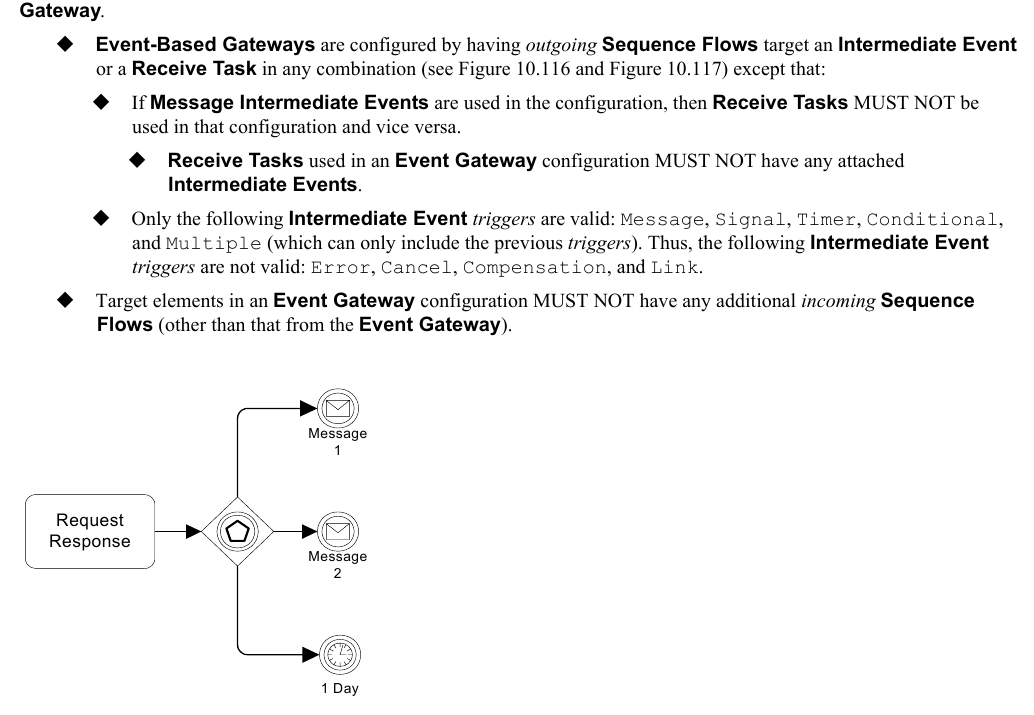
*Figure 10.116 – An Event-Based Gateway example using Message Intermediate Events* (p. 297)
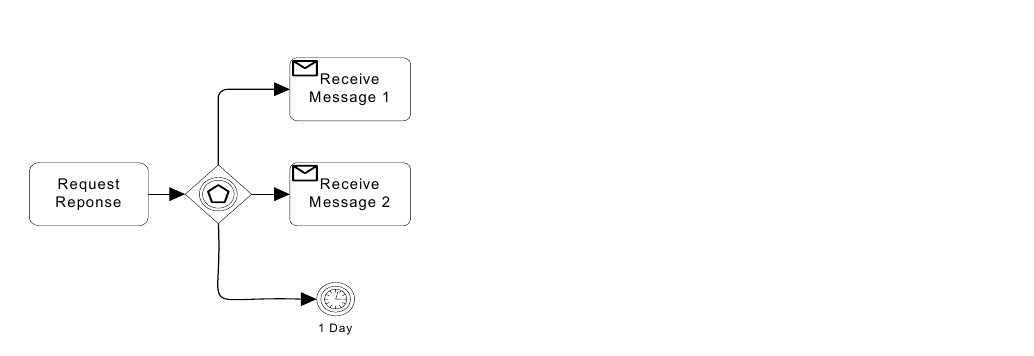
*Figure 10.117 – An Event-Based Gateway example using Receive Tasks* (p. 297)
When the first **Event** in the **Event Gateway** configuration is triggered, then the path that follows that **Event** will used (a *token* will be sent down the **Event’s** outgoing **Sequence Flows**). All the remaining paths of the **Event Gateway** configuration will no longer be valid. Basically, the **Event Gateway** configuration is a race condition where the first **Event** that is triggered wins. There are variations of the **Event Gateway** that can be used at the start of the **Process**. The behavior and marker of the **Gateway** will change. **Event Gateways** can be used to instantiate a **Process**. By default the **Gateway’s** instantiate attribute is *false*, but if set to *true*, then the **Process** is instantiated when the first **Event** of the **Gateway’s** configuration is triggered. If the **Event Gateway’s** instantiate attribute is set to *true*, then the marker for the **Event Gateway** looks like a **Multiple Start Event** (see Figure 10.118).

*Figure 10.118 – Exclusive Event-Based Gateway to start a Process* (p. 298)
In order for an **Event Gateway** to instantiate a **Process**, it MUST not have any *incoming* **Sequence Flows**. In some situations a modeler might want the **Process** to be instantiated by one of a set of **Messages** while still requiring all of the **Messages** for the working of the same **Process** *instance*. To handle this, there is another variation of the **Event Gateway**. If the **Event Gateway’s** instantiate attribute is set to *true* and the eventGatewayType attribute is set to Parallel, then the marker for the **Event Gateway** looks like a **Parallel Multiple Start Event** (see Figure 10.119).
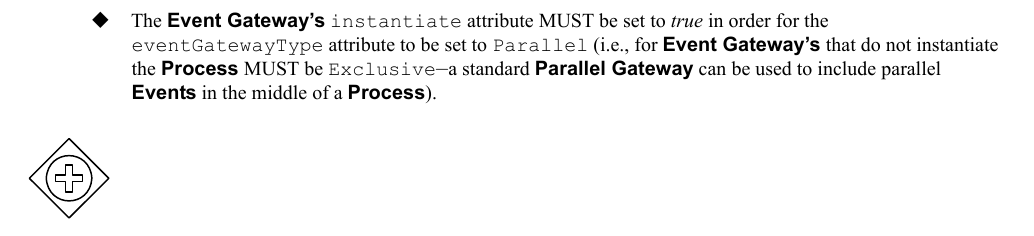
*Figure 10.119 – Parallel Event-Based Gateway to start a Process* (p. 298)
The **Parallel Event Gateway** is also a type of race condition. In this case, however, when the first **Event** is triggered and the **Process** is instantiated, the other **Events** of the **Gateway** configuration are not disabled. The other **Events** are still waiting and are expected to be triggered before the **Process** can (normally) complete. In this case, the **Messages** that trigger the **Events** of the **Gateway** configuration MUST share the same correlation information.
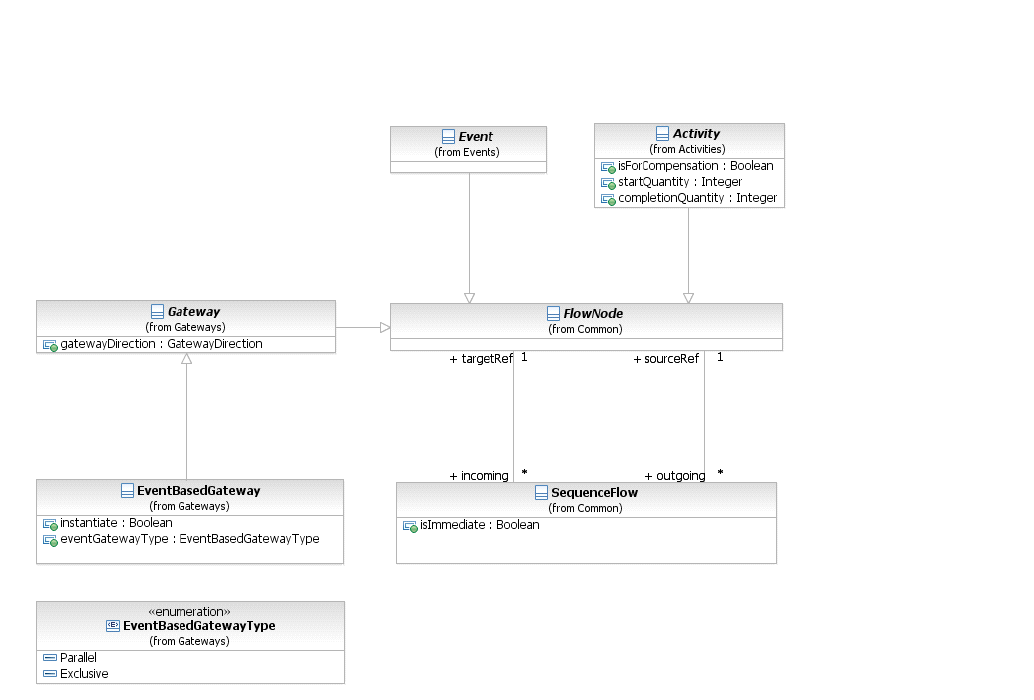
*Figure 10.120 – Event-Based Gateway class diagram* (p. 299)
The **Event-Based Gateway** element inherits the attributes and model associations of **Gateway** (see Table 8.46). Table 10.127 presents the additional attributes and model associations of the **Event-Based Gateway** element.
**Table 10.127 – EventBasedGateway Attributes & Model Associations**
| Attribute Name | Description/Usage |
| --- | --- |
| **instantiate**: boolean = false | When *true*, receipt of one of the **Events** will instantiate the **Process** *instance*. |
| **eventGatewayType**: EventGatewayType = Exclusive | The eventGatewayType determines the behavior of the **Gateway** when used to instantiate a **Process** (as described above). |
| { Exclusive \| Parallel } | The attribute can only be set to parallel when the instantiate attribute is set to *true*. |
**Event-Based Gateways** can be used at the start of a **Process**, without having to be a target of **Sequence Flows**. There can be multiple such **Event-Based Gateways** at the start of a **Process**. Ordinary **Start Events** and **Event- Based Gateways** can be used together.
### 10.6.7 Gateway Package XML Schemas
**Table 10.128 – ComplexGateway XML schema**
```xml
```
**Table 10.129 – EventBasedGateway XML schema**
```xml
```
**Table 10.130 – ExclusiveGateway XML schema**
```xml
```
**Table 10.131 – Gateway XML schema**
```xml
```
**Table 10.132 – InclusiveGateway XML schema**
```xml
```
**Table 10.133 – ParallelGateway XML schema**
```xml
```